Messages to patients
Klinira writes WhatsApp messages for you: review reminders, vaccinations due, medicine running out, and more. They wait on one list. A person at the counter opens each one in the clinic's own WhatsApp and presses send. Nothing is ever sent by itself.
Before you start
- Press means click once with the left mouse button. Tick means press a small square box so a mark appears in it.
- The computer at the counter needs WhatsApp: the WhatsApp app for Windows, or WhatsApp Web open in the browser, signed in with the clinic's phone.
Send the messages that are waiting
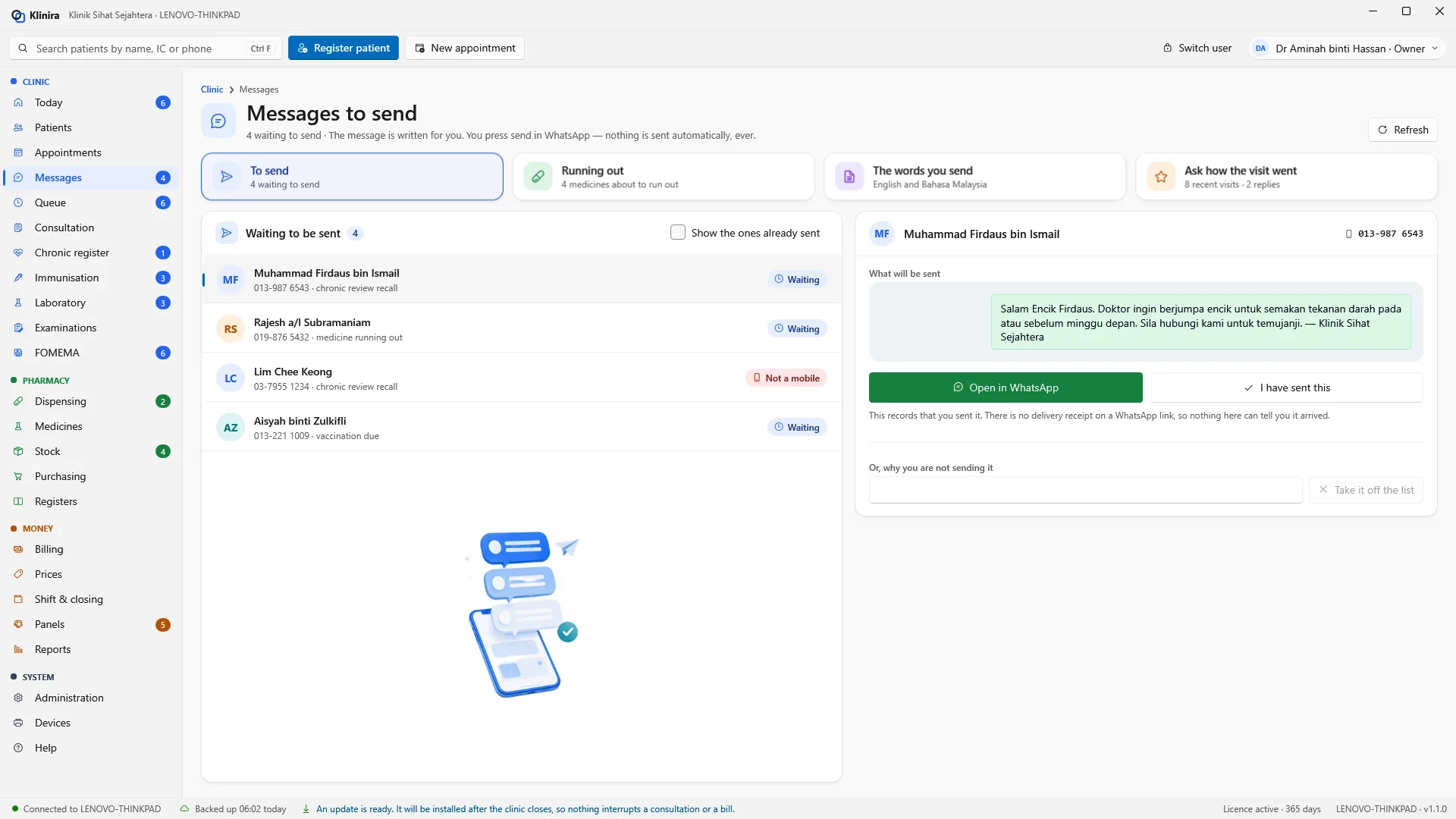
- 1Press Messages in the list on the left. The number beside it is how many are waiting.
- 2Press one message in the list.
- 3Read the message.
- 4Opens WhatsApp with the message already typed.
- 5Press after you have pressed send in WhatsApp.
- 1Press Messages 1 in the list on the left.
- 2Press one message in Waiting to be sent 2. The patient's name and number appear on the right.
- 3Read What will be sent 3.
- 4Press Open in WhatsApp 4. WhatsApp opens on the chat with that patient, with the message already typed.
- 5In WhatsApp, press send.
- 6Come back to Klinira and press I have sent this 5. The message leaves the waiting list.
- Not a mobile in red means the number cannot receive WhatsApp, for example a landline. Telephone the patient instead, then press I have sent this.
- Tick Show the ones already sent to see messages sent earlier.
Take a message off the list without sending it
- 1Press the message in the list.
- 2Type the reason in Or, why you are not sending it, for example "patient has moved to Johor".
- 3Press Take it off the list.
The reason is the clinic's own record of what it decided not to tell a patient. A year later, that sentence is all there is.
Where the messages come from
- The chronic register: a patient whose review is due.
- Immunisation: a child whose next vaccine is due.
- Running out: a medicine that is about to finish. See below.
- The check-in board: "you are nearly up" for patients waiting outside.
- Ask how the visit went: a feedback invitation. See below.
A patient who has asked not to be messaged gets none of these. That choice is ticked on the patient's record.
Remind a patient whose medicine is running out
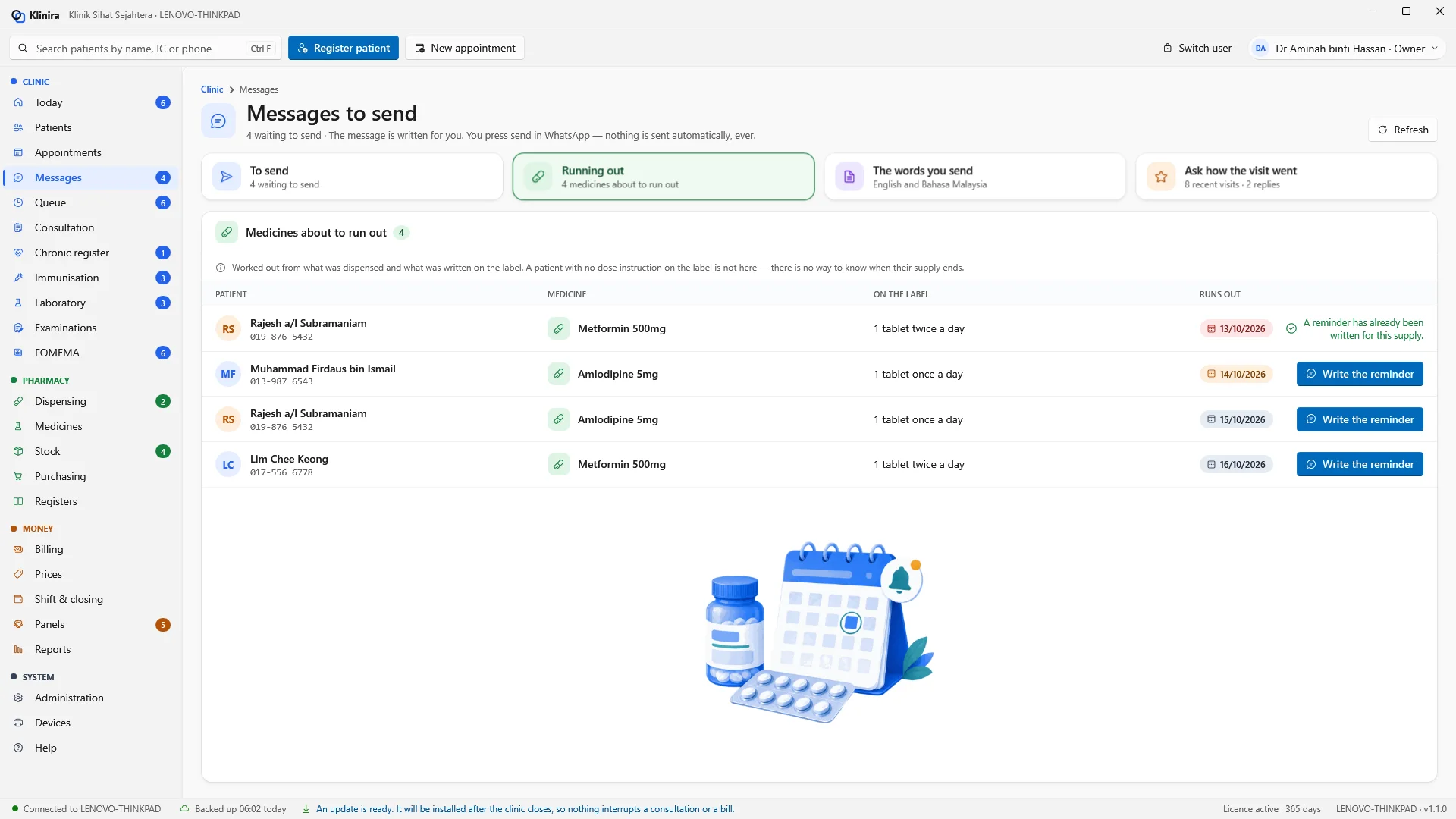
- 1Press Running out, the second box across the top.
- 2Writes a reminder for this patient.
- 1On the Messages screen, press Running out 1 in the row of boxes at the top.
- 2Read the list: the patient, the medicine, what the label says, and the day it runs out.
- 3Press Write the reminder 2. The message is written and waits under To send. Nothing is sent yet. Where a reminder has already been written, the line says so instead of showing the button.
- 4Go to To send and send it as above.
Change the words of a message
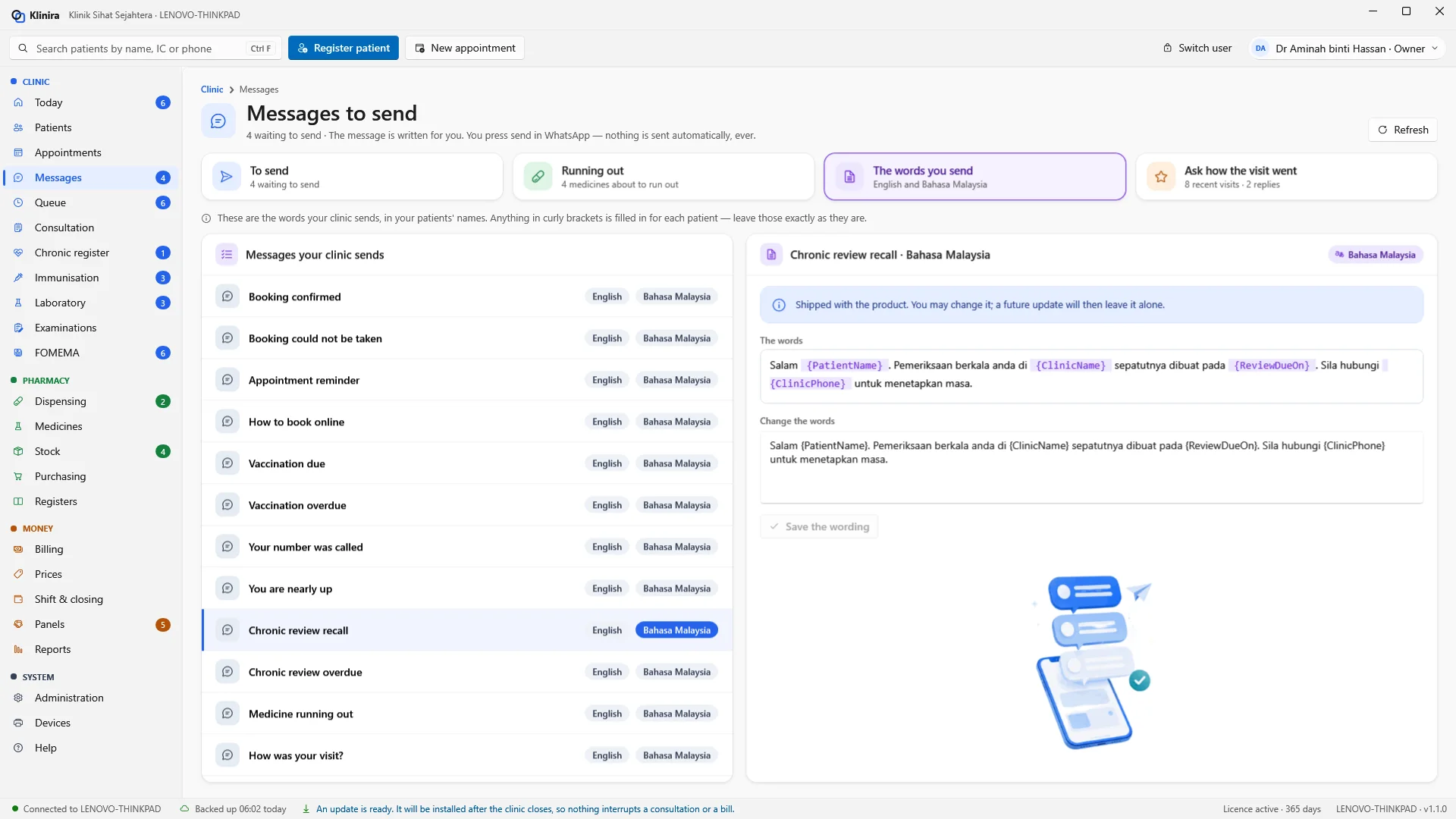
- 1Press The words you send, the third box across the top.
- 2Find the message, then press English or Bahasa Malaysia beside it.
- 3Change the words here.
- 4Save.
- 1Press The words you send 1.
- 2In the list 2, find the message you want to change. Beside it, press English or Bahasa Malaysia for the language you want to change. Each language is changed and saved on its own.
- 3Under The words you see how the message reads now. Change the words in the box Change the words 3. Leave anything in curly brackets, such as {PatientName}, exactly as it is. Klinira fills those in for each patient.
- 4Press Save the wording 4.
Klinira refuses to save a message with a word in curly brackets it does not know, because a message is saved once and sent many times. A message you have changed is left alone by future updates.
Ask patients how their visit went
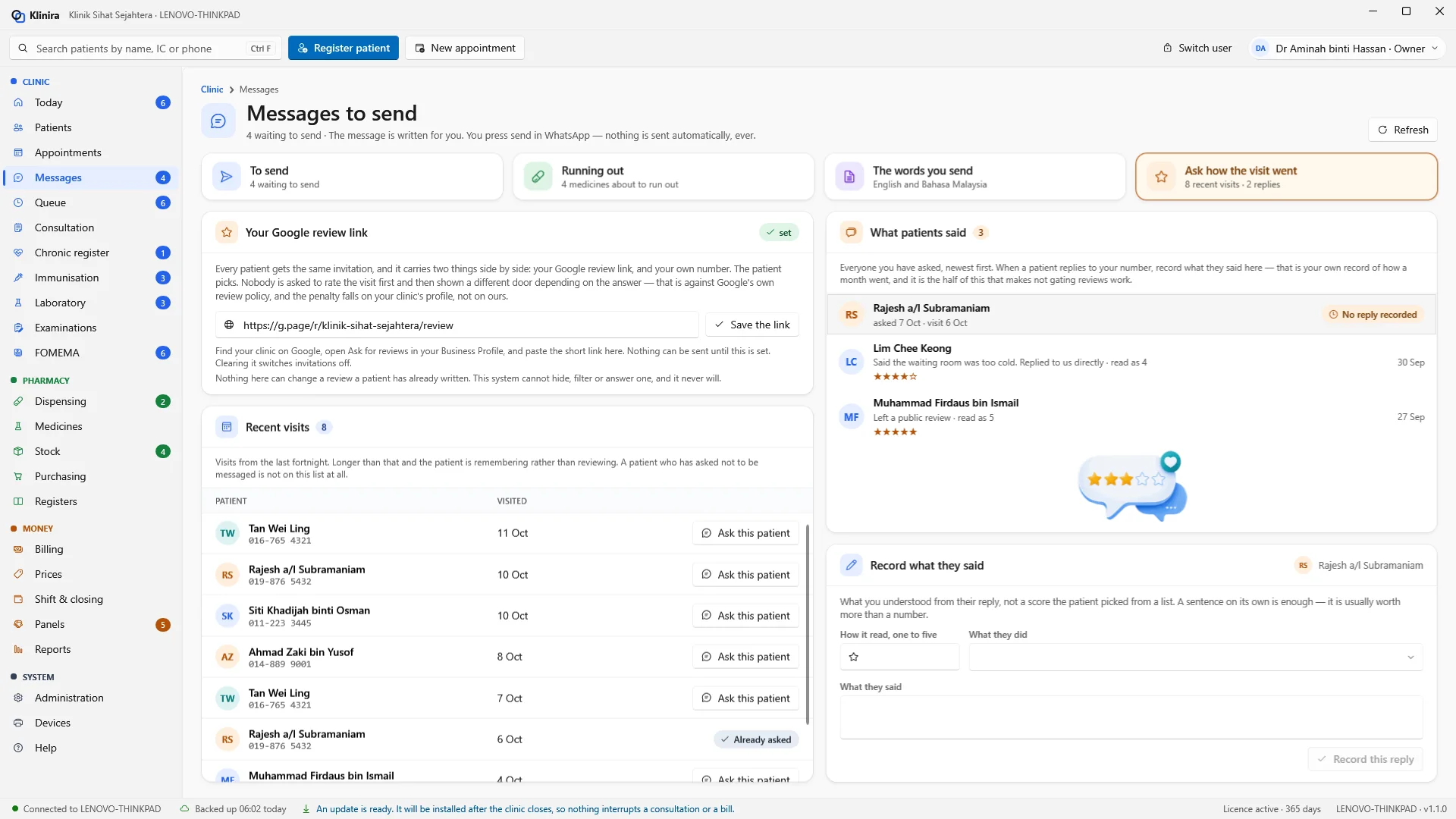
- 1Paste your clinic's Google review link here, once.
- 2Save the link.
- 3Writes an invitation for this patient.
- 4Everyone you have asked, newest first.
- 5Save what the patient told you.
First, set your Google review link
- 1Find your clinic on Google, on your phone or computer.
- 2Open Ask for reviews in your Google Business Profile, and copy the short link.
- 3Paste it into Your Google review link 1.
- 4Press Save the link 2. The word set appears in green beside the heading.
Nothing can be sent until the link is set. Emptying the box switches invitations off, which is a fine choice if the clinic would rather not ask for reviews.
Then, ask a patient
- 1Under Recent visits, press Ask this patient 3 beside the patient.
- 2The invitation is written and waits under To send. Send it from there in WhatsApp.
- Only visits from the last two weeks are offered.
- Each visit can be asked about once. Then it says Already asked.
- A patient who asked not to be messaged is not on the list.
Write down what a patient said
- 1In What patients said 4, press the patient. Their name appears beside Record what they said.
- 2In What they said, write what they told you. One sentence is enough.
- 3If you know, choose What they did, for example left a public review or replied to you directly.
- 4If you like, type in How it read, one to five how the reply sounded to you. It can be left empty.
- 5Press Record this reply 5.
Nothing here can change, hide or answer a review a patient has already written on Google, and it never will.
If something goes wrong
- Open in WhatsApp does nothing, or opens a browser page. WhatsApp is not set up on this computer. Install the WhatsApp app for Windows, or open WhatsApp Web and sign in with the clinic's phone.
- A patient is missing from the list. They may have asked not to be messaged. Check the Messages box on the left side of their record.
- Klinira says no invitation can be sent yet. No review link is set. Set the Google review link first, at the top left of the same screen.
- Save the wording refuses. A word in curly brackets was changed or misspelt. Put it back exactly as it was.
Common questions
Does Klinira send WhatsApp messages automatically?
No, never. It writes the message and opens WhatsApp with it typed in. A person presses send.
Which phone number do patients see?
The number of the WhatsApp signed in on the counter computer. Use the clinic's own phone for this, not somebody's personal phone.
Can I send the messages in Bahasa Malaysia?
Yes. Every message has an English and a Bahasa Malaysia version, and you can change the words of both.
Do messages work without internet?
Klinira keeps writing them onto the list. Sending needs WhatsApp, and WhatsApp needs the internet. Send them when the internet is back.
A patient asked us to stop messaging them. What do I do?
Open their record, tick This patient has asked us not to send them messages in the Messages box on the left side, and press Save this. Every kind of message stops.
Try it at your own counter first
Klinira is on the Microsoft Store. Install it on the clinic's main computer, press Start the free trial, and you have every module for 14 days. No card. If you would rather we show you first, leave your number.