How to install Klinira
Klinira is installed from the Microsoft Store on the clinic's Windows 10 or 11 computer. Five steps, and we will help you through them for free if you would like.
Before you start
- A Windows 10 or 11 computer that stays on during clinic hours. This becomes the main computer and keeps the records.
- The clinic's name, registration numbers and address.
- Internet, once, to start the free trial. After that the clinic works with or without it.
- A printer, for the two Recovery Key sheets.
1. Open Klinira in the Microsoft Store
On the clinic's Windows computer, press the badge below. It opens Klinira's page in the Microsoft Store. You can also open the Store and search for Klinira.
 Free for 14 days. No card.
The Microsoft Store is Microsoft's own app store, built into Windows. Microsoft checks the Klinira package and signs it before it is published, so there is no installer file from a website to trust, and updates arrive through the Store.
2. Press Get or Install
- 1Press Get. On some computers it says Install.
- 2You may be asked to sign in to the Store with a Microsoft account. Sign in, or use the account the computer already has.
- 3Wait until it finishes, then press Open. Next time, find Klinira in the Start menu.
3. Choose This is the main computer
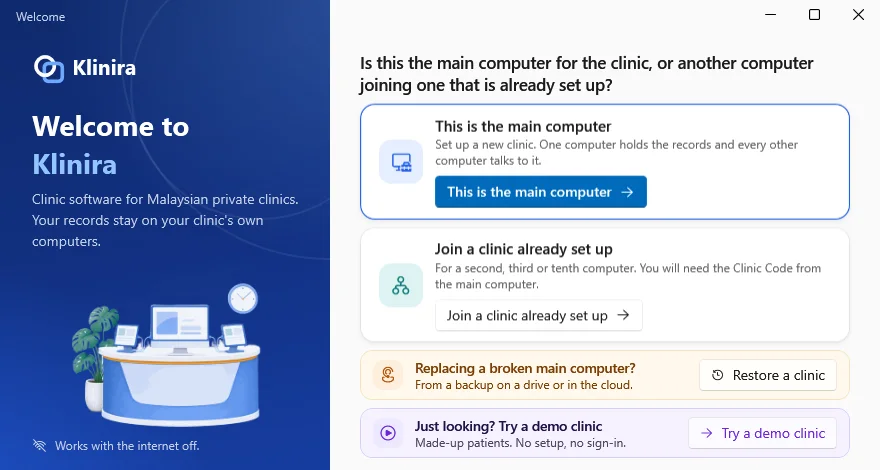
- 1On the main computer.
- 2On every other computer.
- 3Just looking: a sample clinic.
- 1On the main computer, press This is the main computer 1. Only one computer in the clinic is the main computer.
- 2Want to look around first? Try a demo clinic 3 opens a sample clinic with made-up patients. Nothing in it is kept.
4. Set up the clinic and start the free trial
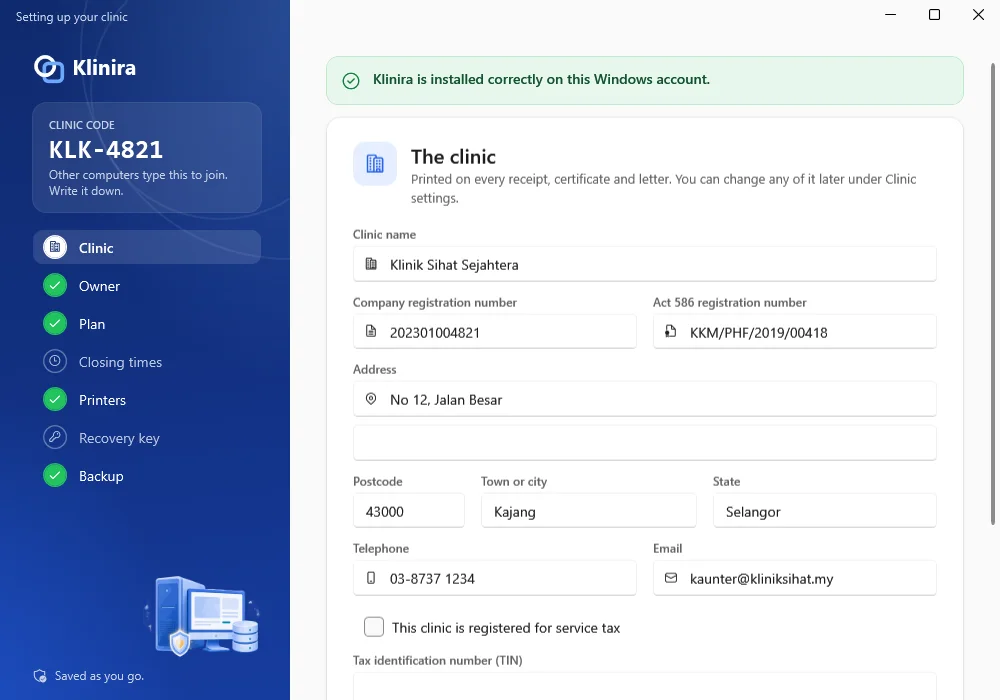
- 1The Clinic Code. Write it down.
- 2The clinic's details.
- 1Write down the Clinic Code 1. The other computers need it to join.
- 2Type the clinic's details 2 and press Save and carry on.
- 3Make the owner's account and press Create the account. Then press Sign in and sign in with it.
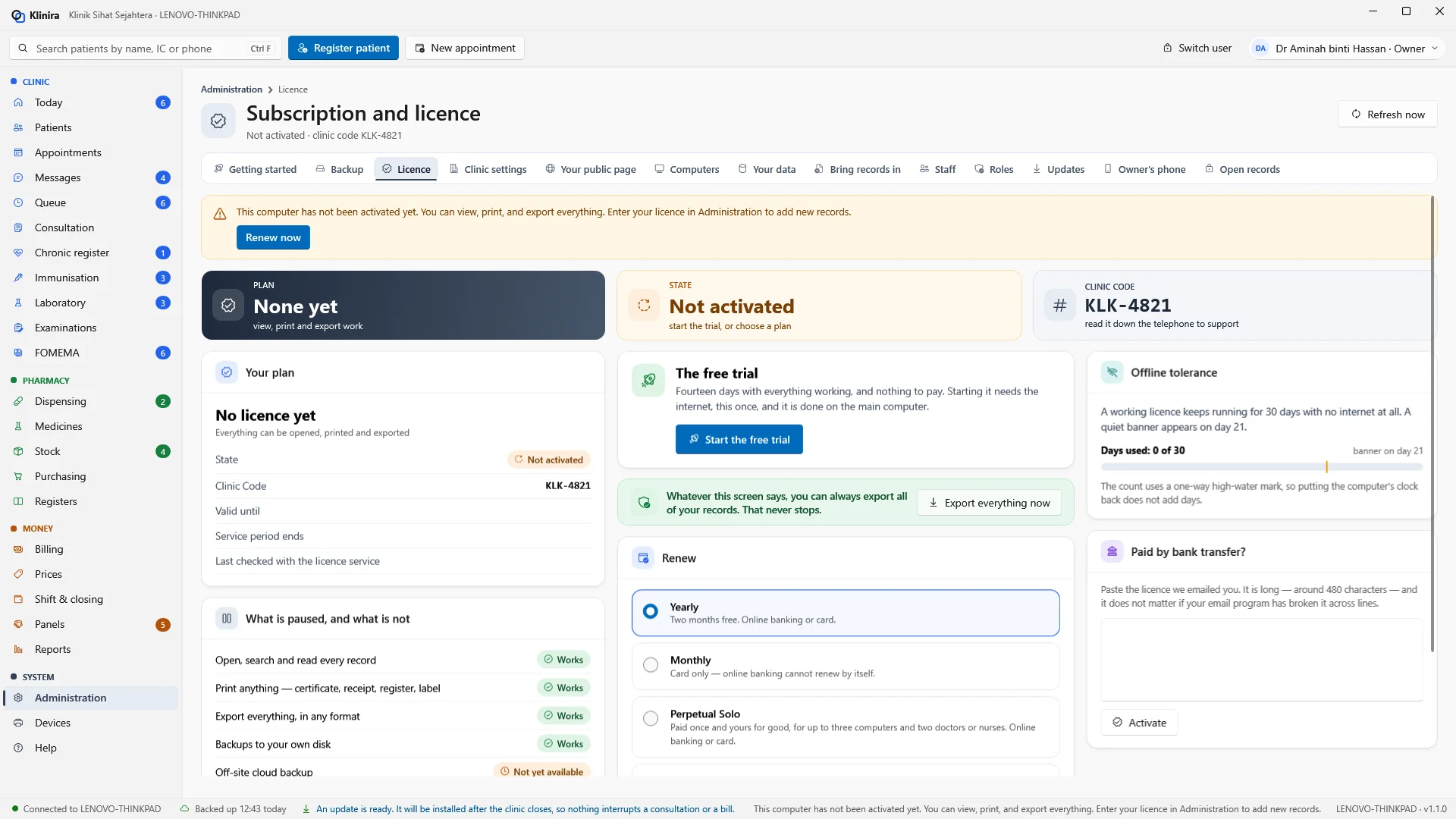
- 1Press to start the trial.
- 1On the Licence screen, press Start the free trial 1. This needs the internet, this once. Every module then works for 14 days, with no card.
- 2Finish the remaining steps: closing times, printers, the Recovery Key sheets and where backups go. The guide's first chapter shows every screen.
5. Other computers: Join a clinic already set up
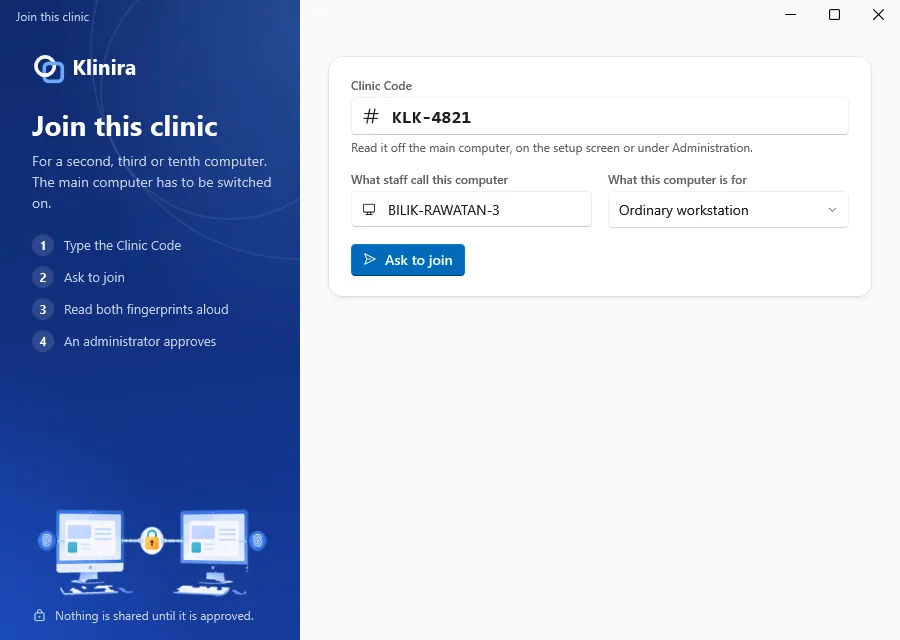
- 1The Clinic Code from the main computer.
- 2Ask the main computer.
- 1On each other computer, install Klinira from the Store as in steps 1 and 2, open it and press Join a clinic already set up.
- 2Type the Clinic Code 1, give the computer a name everybody knows, and press Ask to join 2.
- 3On the main computer, open Administration, then Computers. Read the two codes aloud with the person at the new computer, and press Approve only if they match.
We help you install it, free
If you would rather not do it alone, we install it with you and train your staff, remotely by video call, at no cost. Email us at [email protected], or leave your details on the Contact page.
Common questions
Can I install it on a phone or a Mac?
No. Klinira runs on Windows 10 and 11 only. The records stay on the clinic's own computer.
How long does it take?
About two hours for a three-computer clinic, and you do not need to close. Most clinics do it after the last patient.
Do I need a Microsoft account?
The Store may ask you to sign in with one before it installs. Klinira itself asks for no Microsoft account.
Try it at your own counter first
Klinira is on the Microsoft Store. Install it on the clinic's main computer, press Start the free trial, and you have every module for 14 days. No card. If you would rather we show you first, leave your number.