Immunisation
A child's vaccination record, the National Immunisation Programme schedule worked out from their own date of birth, and the list of who has not come for their injection.
What the screen tells you first
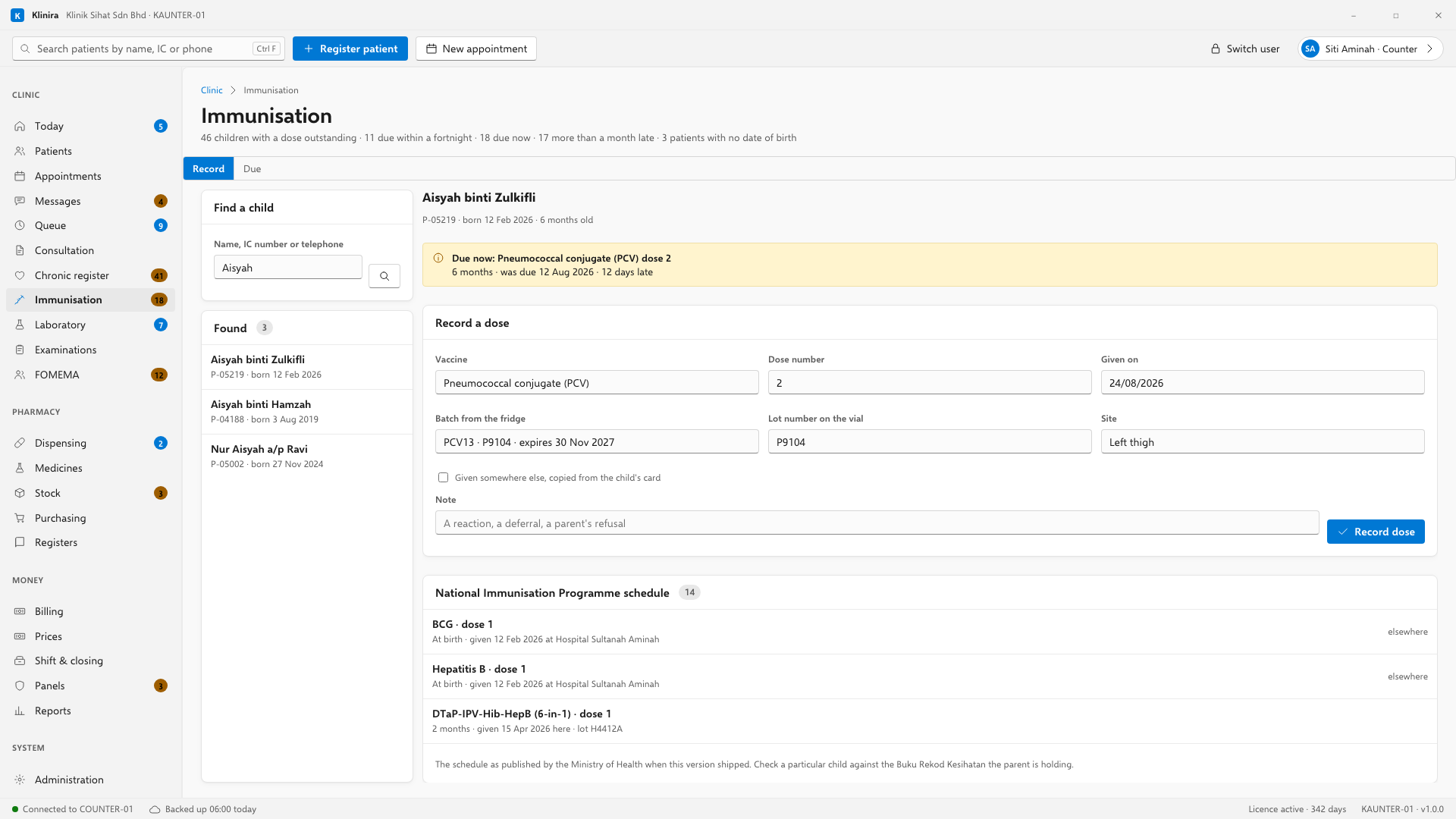
Open a child and the line under their name says which dose they are due for and how late it is. That is the question you opened the screen with, so it is above everything else — the recording form is next, and the full schedule below it for reference.
Recording a dose you gave
- 1Click the row on the schedule. The vaccine and the dose number fill themselves in.
- 2Choose the batch from the fridge list, or type the lot number off the vial if the fridge is not set up in Klinira.
- 3If the fridge list is empty, Klinira says so and — for whoever keeps the stock — offers to link the vaccine to the right item in your stock list. Do it once and the batches appear from then on.
- 4Check the site. Klinira suggests the thigh under a year old and the upper arm after that; change it if you put it somewhere else.
- 5Press Record dose. If you chose a batch, one vial comes off the stock.
A child who is behind
Record the dose you gave today and the rest of the course spreads out from it. A four-year-old who has had nothing does not become overdue for three more injections the moment you catch them up: each dose falls due the proper interval after the one before it, so the next appointment is a real date and not four injections in one visit.
Vaccines that are not on the schedule
Rotavirus, the flu jab, chickenpox, the travel vaccines and the meningococcal dose for the Hajj are all recorded the same way, and appear under "Other doses given" rather than on the programme schedule. Nobody is ever told a child is overdue for a vaccine their parents chose not to buy.
Correcting a dose
Click a dose that has already been given and the correction form opens with what it says already filled in. Change what was wrong, say why, and save. The old version stays with its date and your name on it, the same as every other clinical record.
The copy the parent takes home
Press "Print for the parent" and Klinira produces the whole record on one page, in Bahasa Malaysia and English, with what has been given, what is due and when. It says on the page that the Buku Rekod Kesihatan is the official record and this is the clinic's copy — so nobody presents it in place of the book.
Calling children back
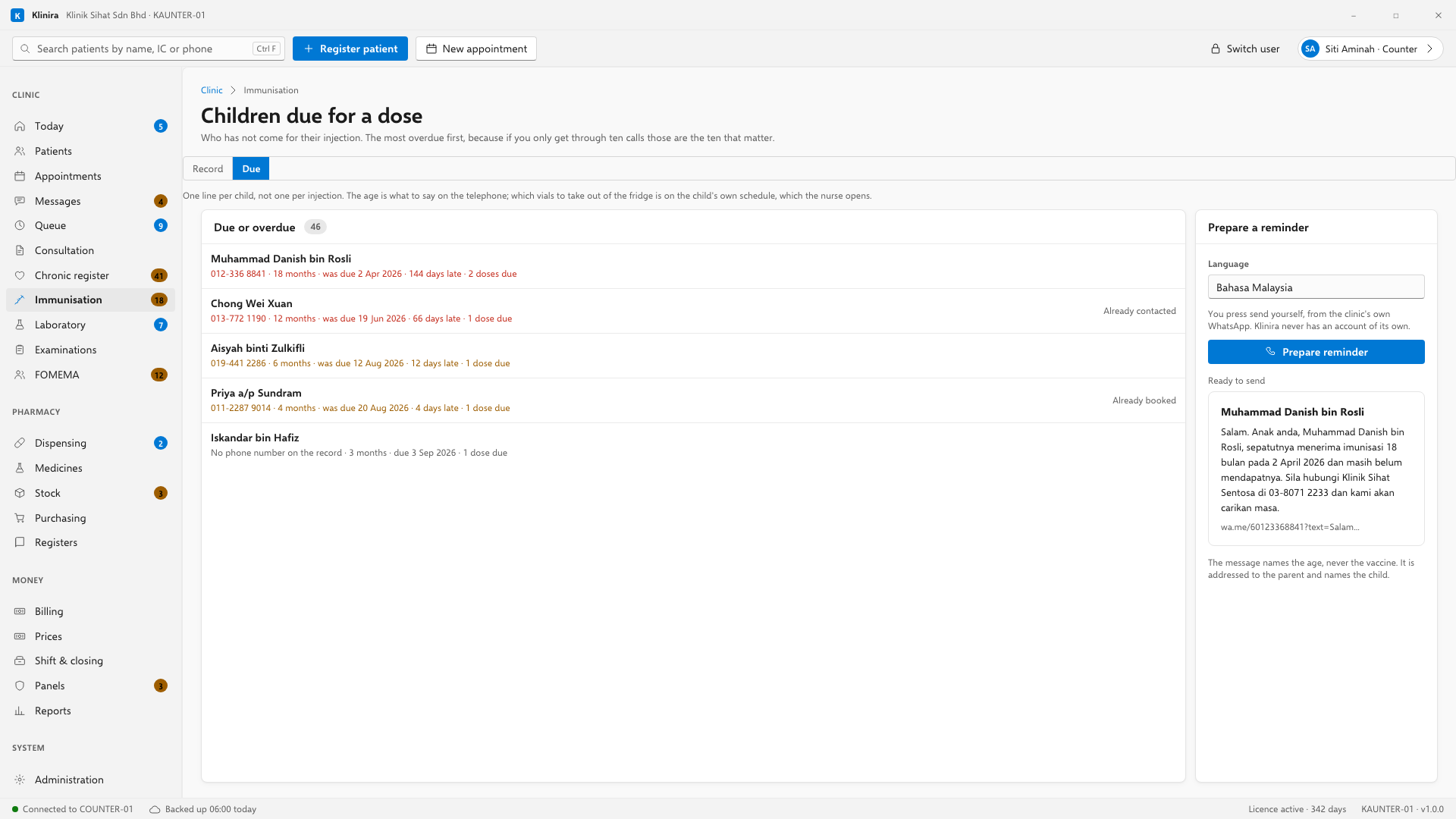
This is the counter's list. One line per child, not one per injection — a four-month-old is usually due two vaccines at once, and that is one telephone call, not two. Most overdue at the top.
The message is addressed to the parent and names the child. Nothing is sent for you: Klinira writes it and opens your own WhatsApp with it ready, and you press send.
The two reports
- Immunisation coverage — for each dose on the schedule, how many children are old enough for it, how many have had it, and how many are more than a month behind. Children too young are not counted, so registering newborns never looks like a fall in coverage.
- Overdue immunisations — every child more than a month past a dose, with the vaccine named and their telephone number, ready to print and work down.
Take a place in the first installs
Klinira is being built now. Leave your details and you will hear what is finished, be asked what your clinic actually needs, and get the first install dates when it is ready.