The Today screen
The screen the clinic opens on. It answers the four questions somebody arriving at eight in the morning actually has, and it is the only screen designed to be looked at rather than worked in.
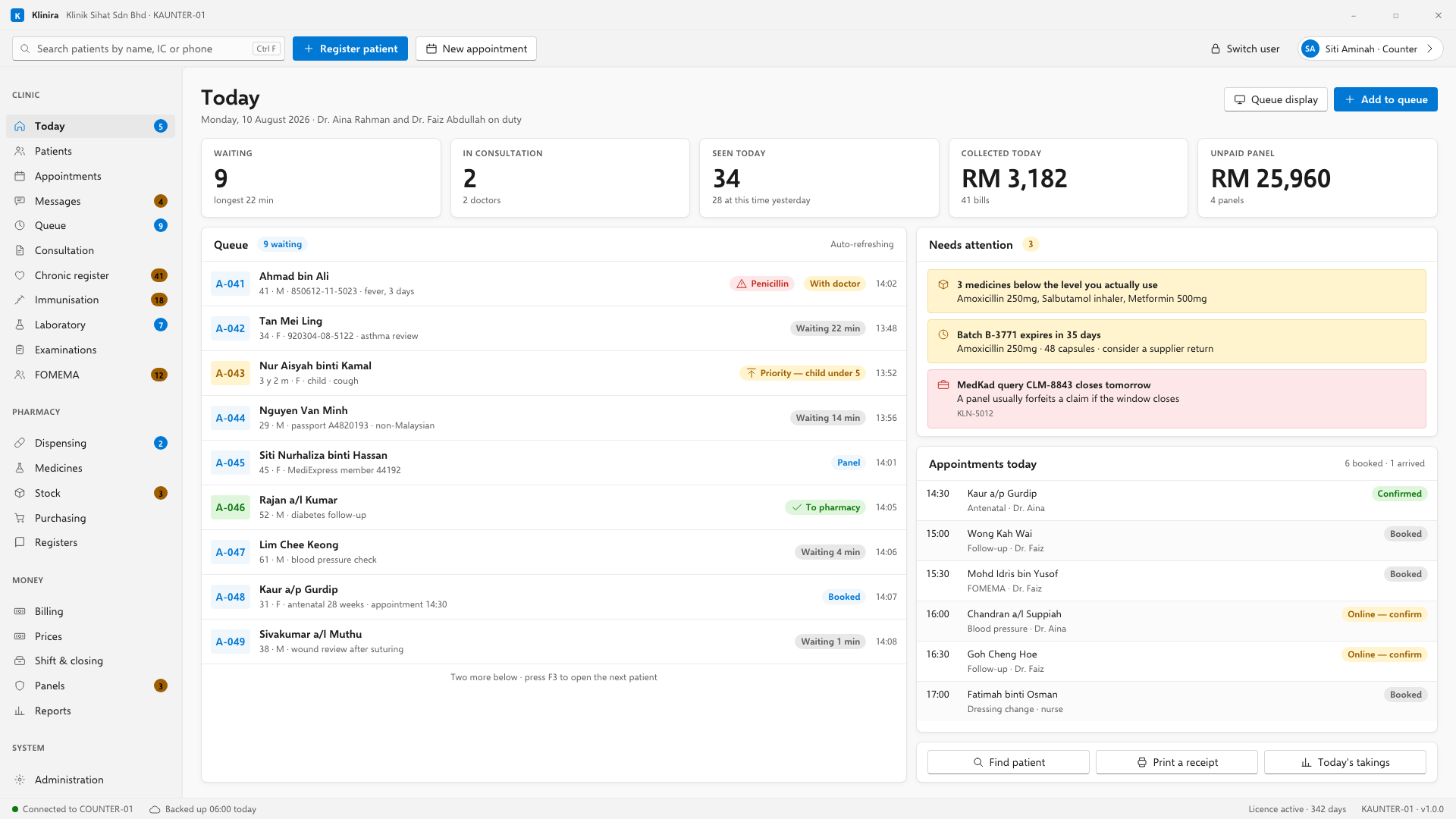
What is on it
- Today's appointments, in time order, with who has arrived and who has not.
- The live queue: how many are waiting and how long the longest has been there.
- Things that need attention: stock about to expire, panel claims unpaid, a backup that has not run.
- The day's takings so far, and whether the till session is open.
The bar at the top
The search box at the top of every screen finds a patient by name, identity number or telephone. It is the fastest way into anything: type three characters and the matches appear as you go.
- Ctrl+F puts the cursor in it from anywhere.
- Register patient and New appointment are beside it, because those are the two things a counter does most.
The strip at the bottom
The line along the bottom of every screen tells you three things without being asked: whether this computer can reach the main PC, when the last backup ran, and how many days are left on the licence. If any of the three is wrong, that strip is where you will see it first.
Take a place in the first installs
Klinira is being built now. Leave your details and you will hear what is finished, be asked what your clinic actually needs, and get the first install dates when it is ready.