Medicines, stock and purchasing
What each medicine is, what is on the shelf by batch and expiry, and how it gets there. Dispensing moves stock by itself, so the work here is checking your medicines, receiving, counting and watching what is about to expire.
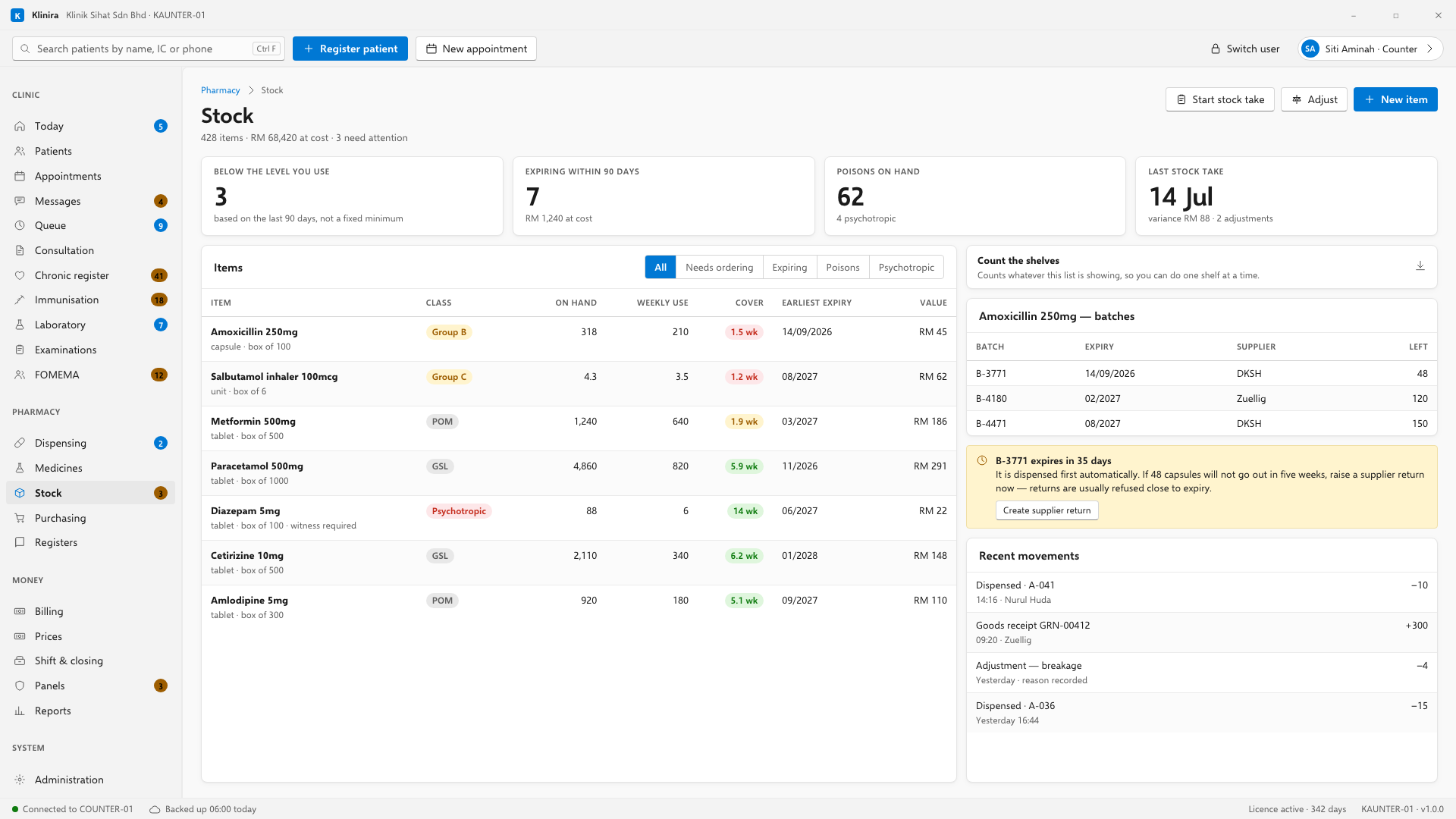
Your medicines, and what your label says
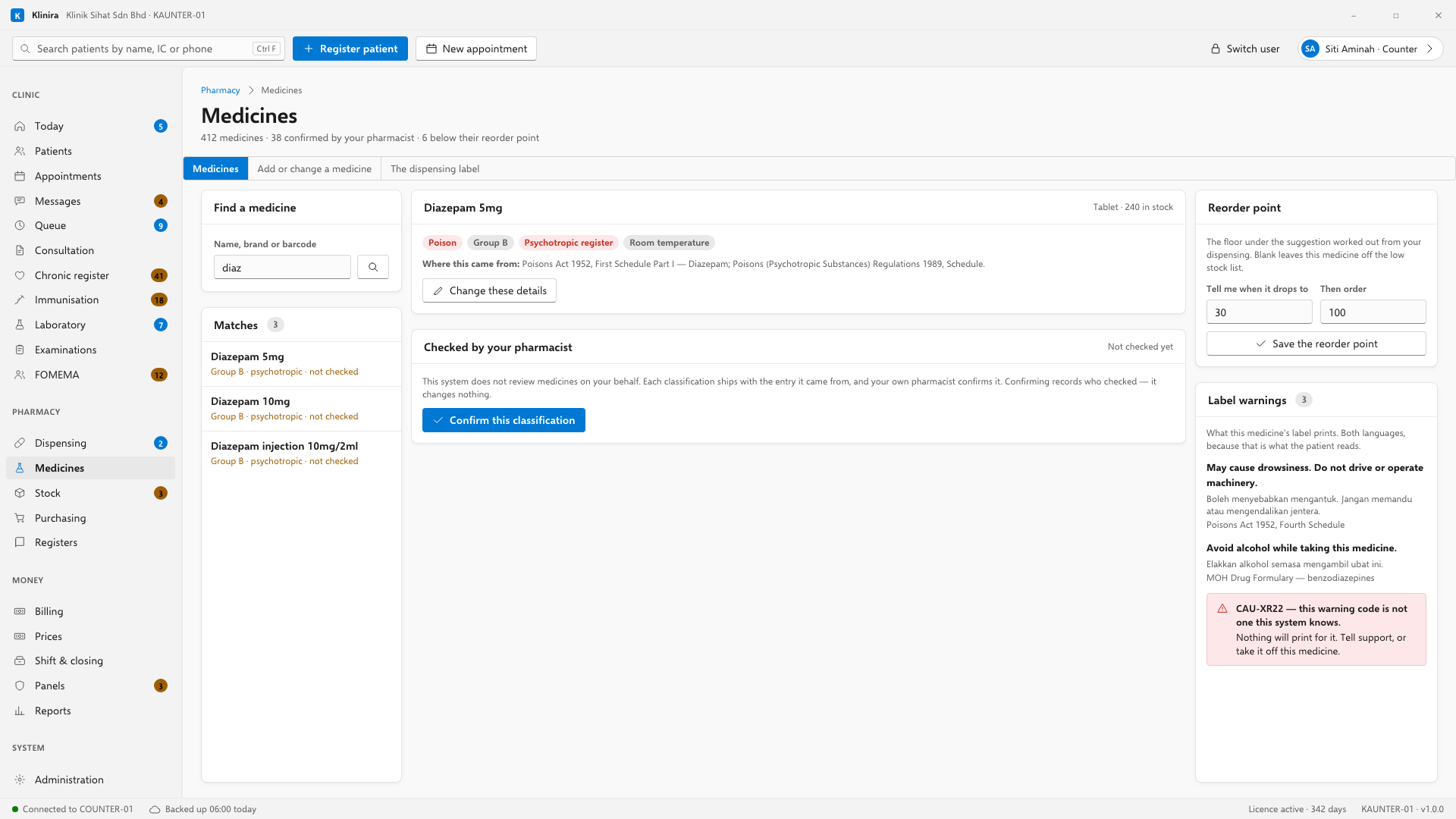
This is the drug master — what each medicine is, rather than how much of it you have. Three jobs live here, and the first is the one that matters most.
The reorder point
Klinira works out what to reorder from what you actually dispense. The reorder point is the floor underneath that, for a medicine nothing has been dispensed of yet — a new item, or one you keep for emergencies. Leave it blank and the medicine is simply left out of the low stock list, which is a real answer rather than a gap.
The warnings on the label
The right-hand panel shows what this medicine's label prints, in English and in Bahasa Malaysia, with the source of each warning beside it. If a warning code on a medicine is one Klinira does not recognise, it is shown in red rather than quietly left out — nothing would print for it, and the only person who could notice is whoever is reading this panel.
Adding a medicine, or correcting one
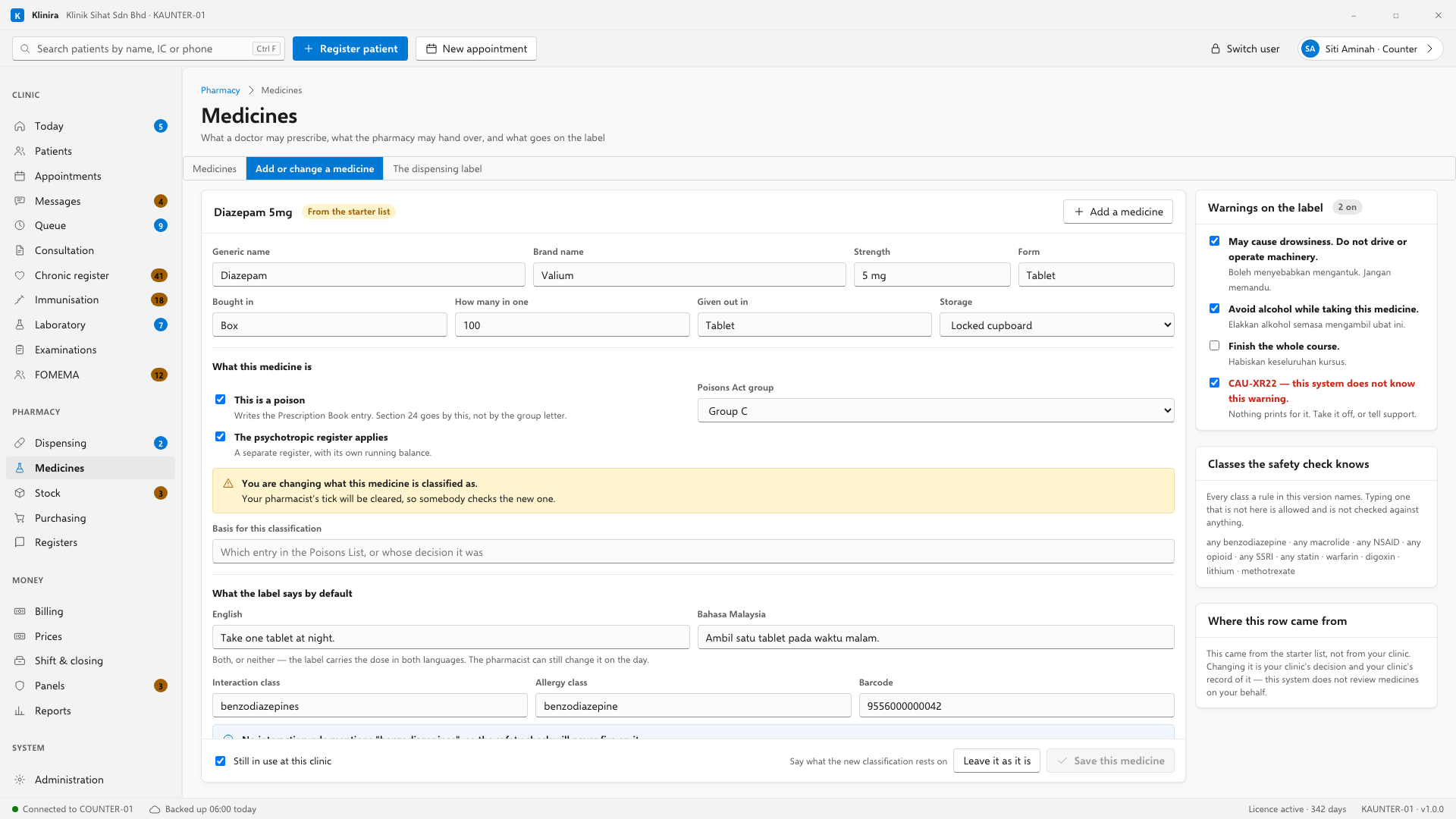
Change these details on the medicine opens the form; Add a medicine opens it empty, for something you have started stocking. This is where a wrong strength, a wrong pack size, a barcode, your own wording for a dose or the warnings on the label are put right. Nothing here is deleted — a medicine you have stopped stocking is switched off, so everything already dispensed still makes sense years later.
- The poison tick is what writes the Prescription Book entry, not the group letter. Klinira will not let you save a medicine that is in a group with the tick off.
- The psychotropic tick cannot be taken off a medicine that already has entries in the register. Those entries would stay in the record with no balance to check them against.
- A default dose instruction needs both languages, because the label carries both. The pharmacist can still change it on the day.
- The interaction class and the allergy class are what the safety check matches on. Type one no rule mentions and Klinira says so — it does not refuse it, but a class nothing names is a check that will never fire.
Changing the dispensing label
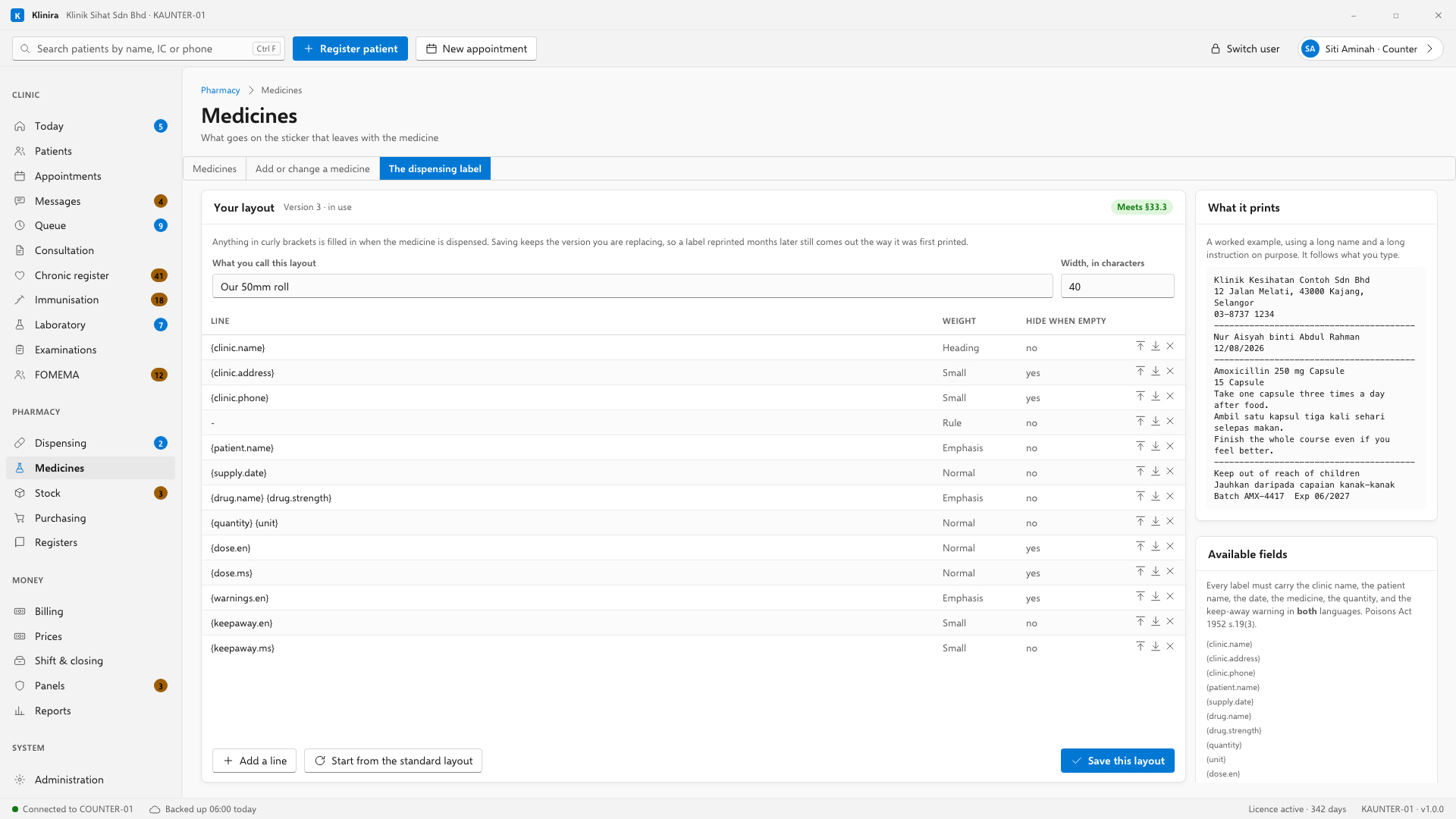
Klinira ships a 40-character layout that fits the common 50mm thermal roll. If your label stock is a different size, or you want your address on two lines instead of one, this is where you change it. Anything in curly brackets is filled in when the medicine is dispensed; the list on the right is every field you can use, written the way you type it.
- What you type shows up on the right straight away. Nothing is saved until you press Save this layout.
- Saving keeps the version you replaced. A label reprinted months later still comes out the way it was first printed, which the law requires.
- Start again from the standard layout puts everything back to what Klinira ships. It changes nothing until you save.
Counts you can come back to
A stock take takes an afternoon, and nobody counts a pharmacy without being interrupted. Every count is listed under Counts, with how many lines already have a number against them, and Open this count picks it back up with everything you have typed still in it. Closing the screen does not lose a count, and neither does restarting the computer.
Receiving stock
- 1Open the purchase order the delivery is against — Orders you have raised, then Open this order. The lines are then checked off against what was actually ordered, and the supplier is filled in from the order.
- 2Or start a receipt without one if the delivery arrived unannounced. Buying over the counter is normal and nothing here requires an order.
- 3Enter the batch number and the expiry date for each line. Both are required — stock without an expiry cannot be dispensed oldest-first.
- 4Enter the quantity actually delivered, not the quantity ordered.
- 5Save. The cost per unit updates and the shelf count goes up.
Purchase orders
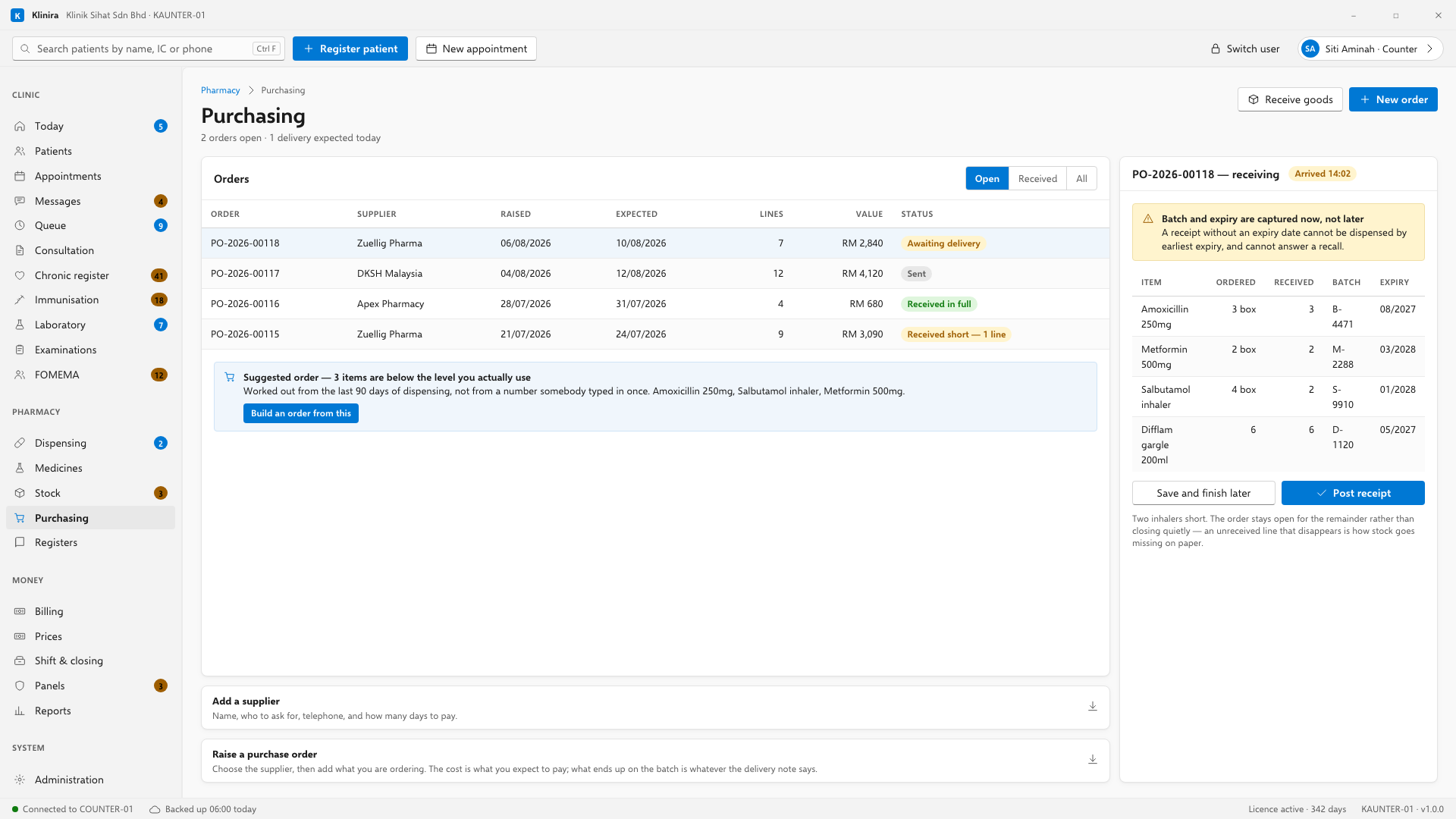
- Klinira suggests what to order from what has been used and what is left.
- A partial delivery stays open until the rest arrives or you close it.
- Print or email the order to the supplier.
Adding a supplier
Add a supplier is the strip at the foot of the purchasing screen. It takes a name, who to ask for, a telephone number and how many days you have to pay. Every delivery and every order is filed against one, so the first supplier goes in before the first order does.
Raising an order
- 1Open Raise a purchase order and choose the supplier.
- 2Add each medicine with how many packs and what you expect to pay for one.
- 3Put in the date you expect it and anything you want to tell them.
- 4Raise the order. It gets its own number and waits on the list until the delivery arrives.
Counting the shelves
Count the shelves is the strip beside the item list, and it counts whatever that list is showing — so filter to one class, or one shelf's worth, and do it a shelf at a time rather than closing the clinic for an afternoon.
- 1Filter the list to what you are about to count, then press Start a count.
- 2Type what is actually on the shelf against each line. What the system thinks is beside it.
- 3Say why you are counting — a routine count, a spot check, an investigation.
- 4Post the count. Every difference is adjusted and recorded against your name.
Expiry
- Anything expiring inside the next three months is flagged on the Today screen.
- Expired stock is blocked from dispensing, not just flagged.
- Cold chain items — vaccines, GLP-1 medicines — are grouped so they can be checked together.
Related pagesDispensingThe statutory registersReports
Take a place in the first installs
Klinira is being built now. Leave your details and you will hear what is finished, be asked what your clinic actually needs, and get the first install dates when it is ready.