The statutory registers
The Prescription Book and the psychotropic register, the two books the law requires. Klinira writes them by itself every time medicine is dispensed. Here you read them, print them for an inspector, and record deliveries and the destruction of controlled medicines.
In this guide, "press" means click once with the mouse. The words in bold are the words you will see on the screen.
Read the Prescription Book
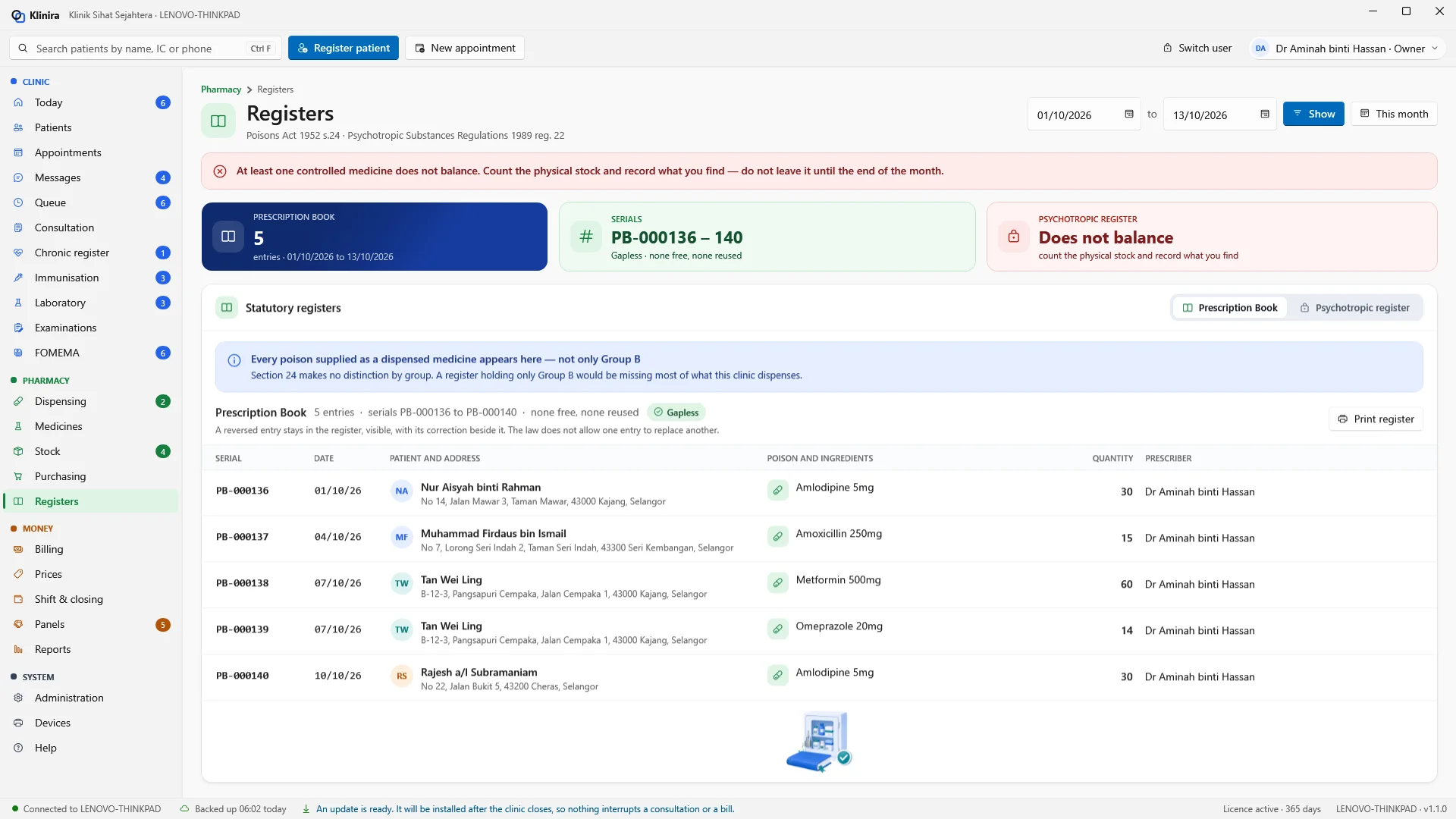
- 1Press Registers in the list on the left.
- 2Set the dates, or press This month.
- 3Press Show.
- 4The Prescription Book tab.
- 5Gapless: no serial number is missing.
- 1Press Registers 1 in the list on the left side of the screen.
- 2At the top right, set the two dates 2, or press This month.
- 3Press Show 3.
- 4The Prescription Book tab 4, on the right above the list, is open. Each row shows the serial, the date, the patient and address, the poison and its ingredients, the quantity and the prescriber.
- 5Look at the line beside the heading. It says how many entries, the first and last serial, and "none free, none reused".
- 6Look at the green tag at the end of that line 5. It should say Gapless.
Section 24 of the Poisons Act 1952 says every poison supplied as a dispensed medicine must be recorded on the same day: the date, a serial number, the poison and its ingredients, the quantity, the patient's name, and their address if it was not on a written prescription. Klinira writes all of that at the moment you press Dispense and print.
- Gapless (green) means the serial numbers in this period follow on with nothing missing.
- Gap found means an entry is missing. Serials are never reused or removed, so a gap is the first thing an inspector asks about. Tell the owner the same day.
- A reversed entry stays in the book, visible, marked "reversed" with its note beside it. Nothing is hidden in a box you have to point at.
Read the psychotropic register
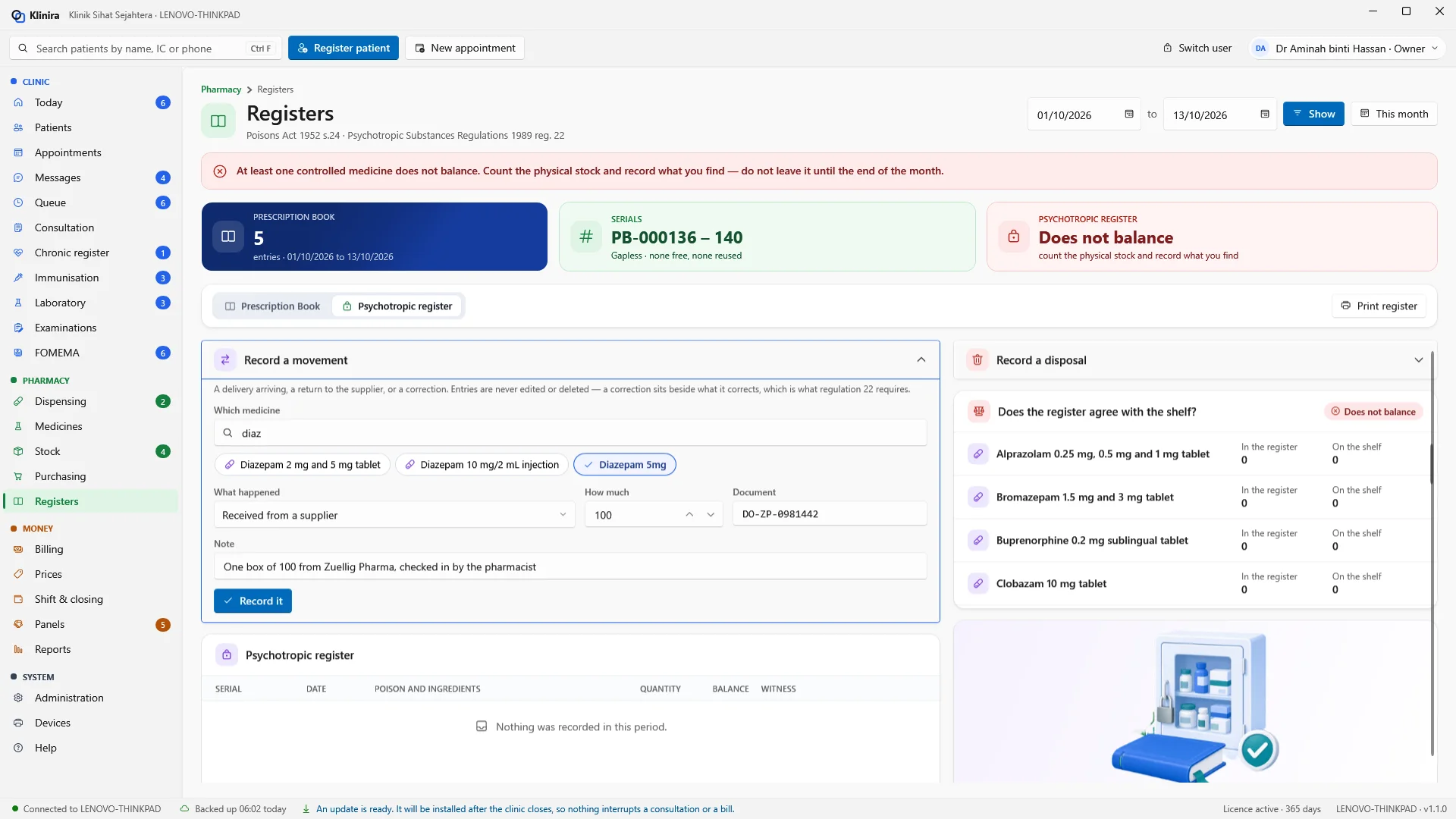
- 1Press the Psychotropic register tab.
- 2Press Record a movement to open or close the form.
- 3What the register says is left, beside what is on the shelf.
- 1Press the Psychotropic register tab 1. On this tab the two tabs sit at the left.
- 2The register itself is under Record a movement. Each row shows the serial, the date, the medicine and the patient, what happened, the quantity and the balance after it, and the witness.
- 3Read Does the register agree with the shelf? 3, on the right. For each controlled medicine it shows In the register and On the shelf. The two numbers should be the same.
This is a separate register with its own serial numbers. An entry is never deleted and never replaced. A correction sits beside the original, as regulation 22 of the Poisons (Psychotropic Substances) Regulations 1989 requires.
Record a delivery, a return or a correction
Dispensing writes itself into the register, and so does a delivery received on the Purchasing screen. Record a movement here only for something that did not go through those screens: a delivery not received on Purchasing, a return to the supplier, or a correction. Do not record the same delivery twice.
- 1Type the start of the name, then press the medicine.
- 2Choose what happened.
- 3Type how much.
- 4Type the supplier's document number.
- 5Press Record it.
- 1On the Psychotropic register tab, press Record a movement to open it.
- 2In Which medicine 1, type the start of the name, for example "diaz". Press the medicine in the list under it. Only psychotropic medicines are offered.
- 3Under What happened 2, choose Received from a supplier, Returned to a supplier or Correction.
- 4Type How much 3.
- 5Type the supplier's Document number 4, for example the delivery order number.
- 6In the long Note box under them, type why.
- 7Press Record it 5. The entry takes the next serial and the balance changes.
Record the destruction of psychotropic stock
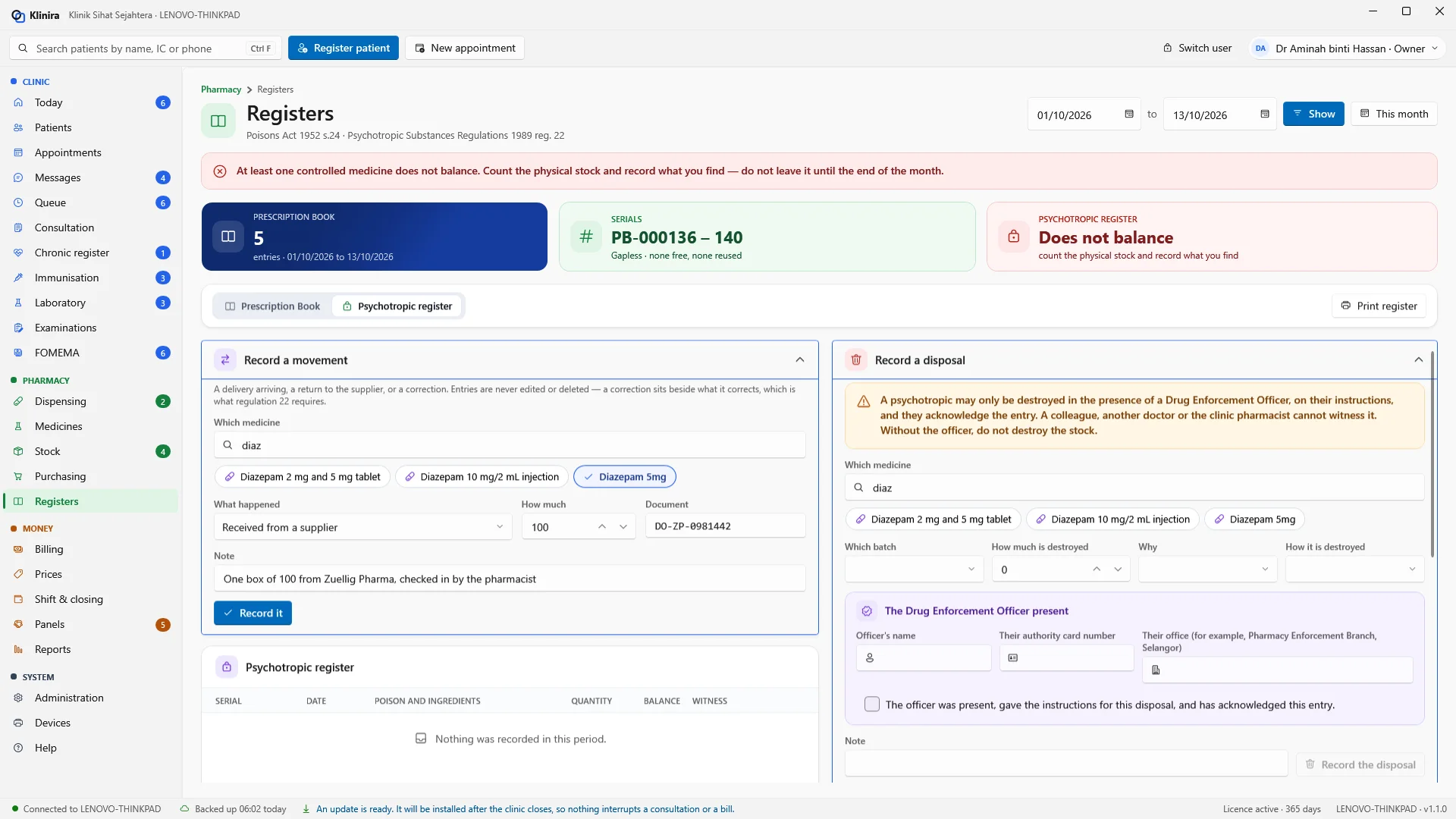
- 1Type the start of the name, then press the medicine.
- 1Do this on the day the stock is destroyed, with the officer beside you. The entry is dated today.
- 2On the Psychotropic register tab, press Record a disposal, on the right beside Record a movement, to open it.
- 3In Which medicine 1, type the start of the name, for example "diaz", and press the medicine in the list under it.
- 4Choose Which batch. Each batch shows its expiry date and how much is left in it.
- 5Type How much is destroyed. It cannot be more than the batch holds.
- 6Choose Why, for example Expired, and How it is destroyed, for example Collected by a licensed waste contractor.
- 7Under The Drug Enforcement Officer present, type the Officer's name, Their office (for example, Pharmacy Enforcement Branch, Selangor) and Their authority card number. Copy them from the officer's authority card.
- 8Show the officer the entry. When they agree, tick The officer was present, gave the instructions for this disposal, and has acknowledged this entry.
- 9Type anything else worth keeping in Note.
- 10Press Record the disposal. Klinira says it was recorded in the psychotropic register, with its serial number, and the balance goes down.
- Record the disposal stays grey until the officer's name, office and card number are typed and the tick is in place. The line under the button says what is still missing.
- Recording a disposal needs a member of staff allowed to do it, signed in with their full password, not the Quick PIN.
- In the register, the Witness column shows the officer's name with their office beside it, so a disposal witnessed by the wrong person is easy to see.
Print a register for an inspector
- 1The Prescription Book tab.
- 2The Psychotropic register tab.
- 3Set the period.
- 4Press Show.
- 5Press Print register.
- 1Choose the tab: Prescription Book 1 or Psychotropic register 2.
- 2Set the two dates 3 at the top right to the period the inspector asked for, and press Show 4.
- 3Press Print register 5. It prints in the layout the register is expected to be kept in.
Register entries are kept for ever. Section 24 sets no period after which they may be thrown away, so a question in 2034 about 2027 can still be answered.
If something goes wrong
- The list is empty. Check the dates. Press This month, then Show.
- A medicine you dispensed is not in the Prescription Book. It is not ticked as a poison on the Medicines screen. Ask the pharmacist to check it there.
- A wrong dispense is in the book. Do not try to remove it. Reverse the dispense on the Dispensing screen. The entry stays, marked reversed.
- The psychotropic register does not balance. Count the shelf, record a correction with a note, and tell the person responsible for controlled medicines.
Common questions
Do I have to write the Prescription Book by hand?
No. Klinira writes an entry every time a poison is dispensed. You only read and print it.
Is it only Group B poisons?
No. Every poison supplied as a dispensed medicine, Group B, C or D.
Can I delete a wrong entry?
No. The law does not allow it. Reverse the dispense, or record a correction. The original stays and the correction sits beside it.
What does "Gap found" mean?
A serial number is missing in that period. Tell the owner the same day. It is the first thing an inspector checks.
A box of diazepam arrived. Where do I record it?
Receive it on the Purchasing screen as usual, with its batch and expiry. Klinira writes the Received entry in the psychotropic register by itself. Do not record it again under Record a movement.
Who may witness destroying psychotropic stock?
Only a Drug Enforcement Officer, present and giving the instructions. Not a colleague, another doctor or the clinic pharmacist. Record it under Record a disposal with the officer's name, office and card number.
Related pagesDispensingMedicines, stock and purchasingReports
Try it at your own counter first
Klinira is on the Microsoft Store. Install it on the clinic's main computer, press Start the free trial, and you have every module for 14 days. No card. If you would rather we show you first, leave your number.