Panels and claims
Klinira does not send anything to a panel — nobody's software can. What it does is tell you what each panel owes you right now, and find the claims their statement quietly left out.
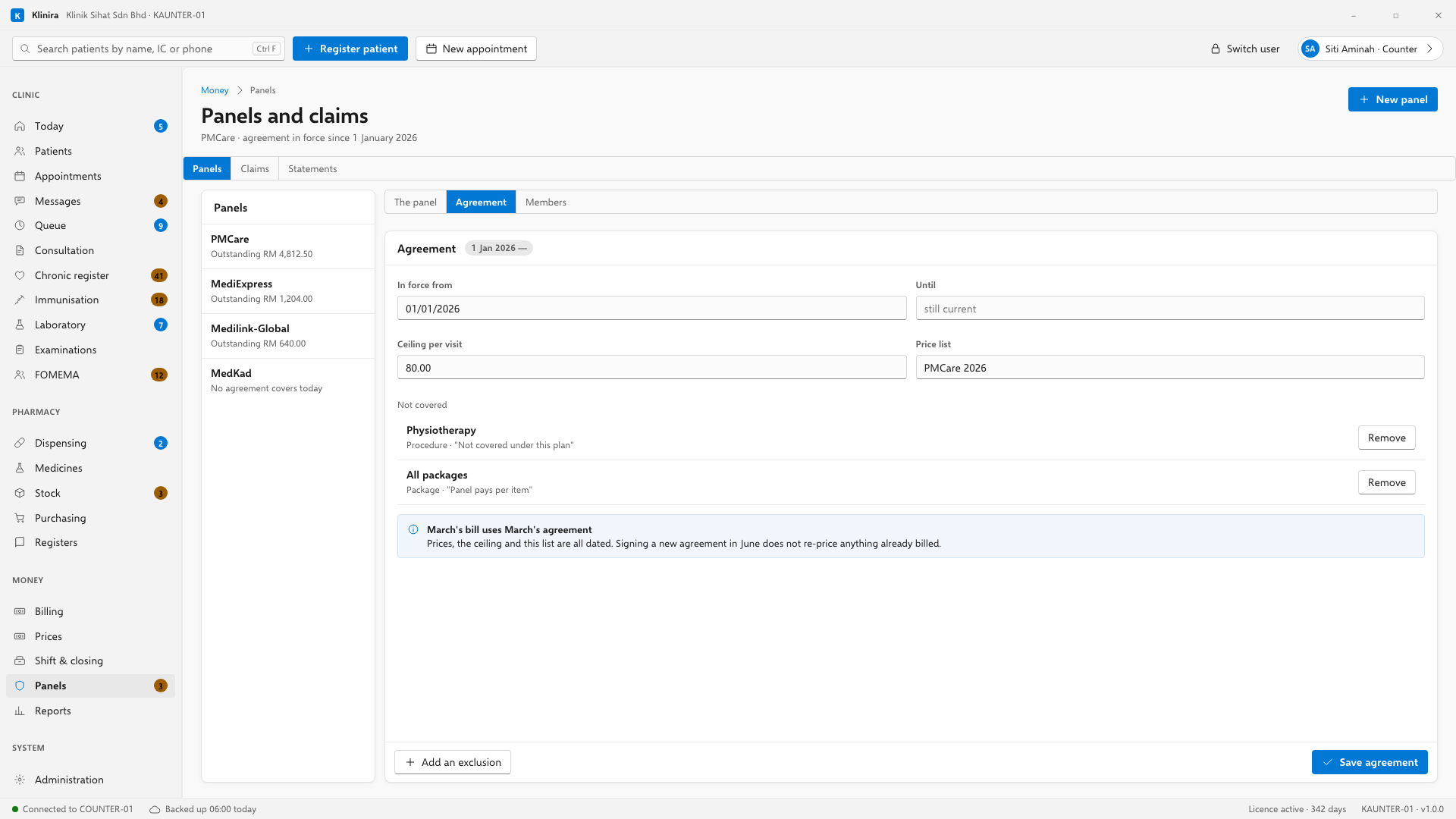
Setting a panel up, once
- 1Money, Panels, New panel. Name, your code with them, and the address of their portal.
- 2Two numbers matter: how many days they take to pay, and how many days you have to answer a query. Both come off your agreement with them.
- 3Then the Agreement tab: the date it starts, the ceiling for one visit, and the list of things they do not cover.
The patient's card
Record the member number exactly as it is printed. That is the number the panel will look for when your claim arrives. If the patient is a spouse or a child covered under somebody else's number, tick dependant and put the principal's number in too — a claim without it comes back queried.
Check eligibility on the panel's portal as you always have, then record what it said: the answer, the reference it gave you, and the figure it showed for how much of the limit is used. Klinira keeps all three with the date. That is what settles an argument three months later, and it is the part a clinic writing on a scrap of paper loses.
At the counter
On the billing screen, choose the panel under "Panel cover". The strip underneath then shows the card number, the ceiling for this visit, anything on the bill the panel does not cover, and roughly how much of the member's yearly limit is left.
| The screen says | What it means |
|---|---|
| Ceiling this visit | The most this panel pays for one visit. Anything above it goes on the patient's half of the bill, and the lines are marked. |
| Not covered | Something on this bill the agreement excludes. The patient pays for it in full — and it does not use up the ceiling. |
| Limit left | An estimate, and the screen says so. A limit is spent wherever the patient goes and Klinira can only see your own bills. If it looks close, check the portal. |
Raising the claim
- 1Finalise the bill and take whatever the patient owes.
- 2Press "Raise the panel claim" on the same screen. It gets a number and sits as a draft.
- 3Key it into the panel's portal as you always have.
- 4Come back to Money, Panels, Claims and press "Mark submitted" with the reference the portal gave you.
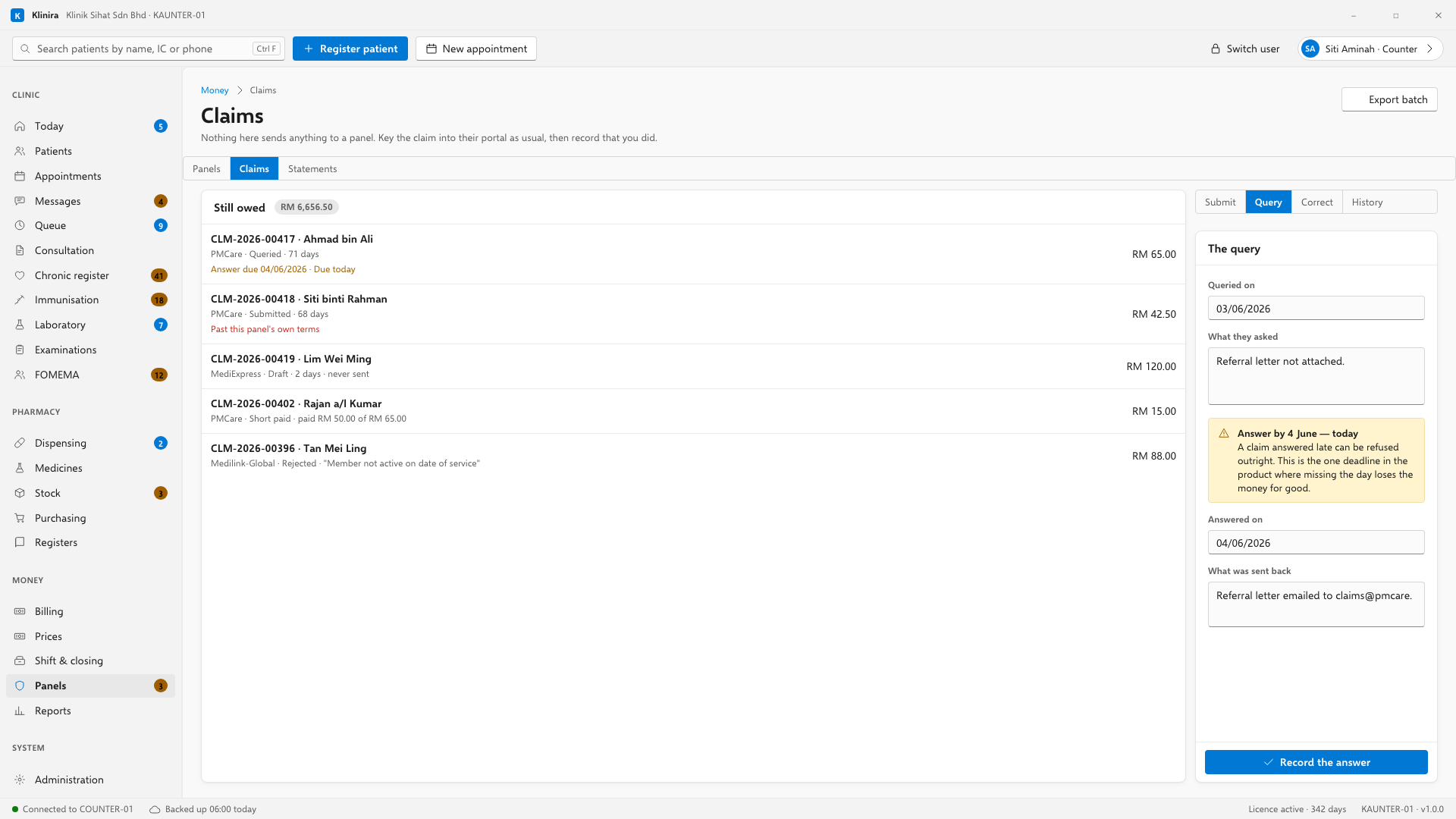
The age on each row is counted from the day you submitted it, not from the day of the visit — a claim that sat in a drawer for a fortnight is not the panel being slow. "Past this panel's own terms" appears only when they really are late by their own contract. A panel with ninety-day terms is not late at day sixty, and telling them so is the fastest way to be ignored when a claim really is overdue.
When a panel queries a claim
- 1Record the query the day it arrives, with the date and what they asked.
- 2Klinira works out when the answer is due from your agreement with that panel, and moves the claim up the list as the day gets closer.
- 3When you have answered, record that too, with what you sent.
A deadline that has already gone stays on the screen marked Missed. It does not disappear, because the money has not disappeared — somebody still has to decide whether to appeal it or write it off.
Correcting a claim you have already sent
Never edited. Press Amend and Klinira raises a second claim linked to the first; the first stays exactly as the panel received it, because that is the only version anybody can argue about. The old one drops off the "still owed" list so the same treatment is never counted twice.
The monthly statement — the part that finds money
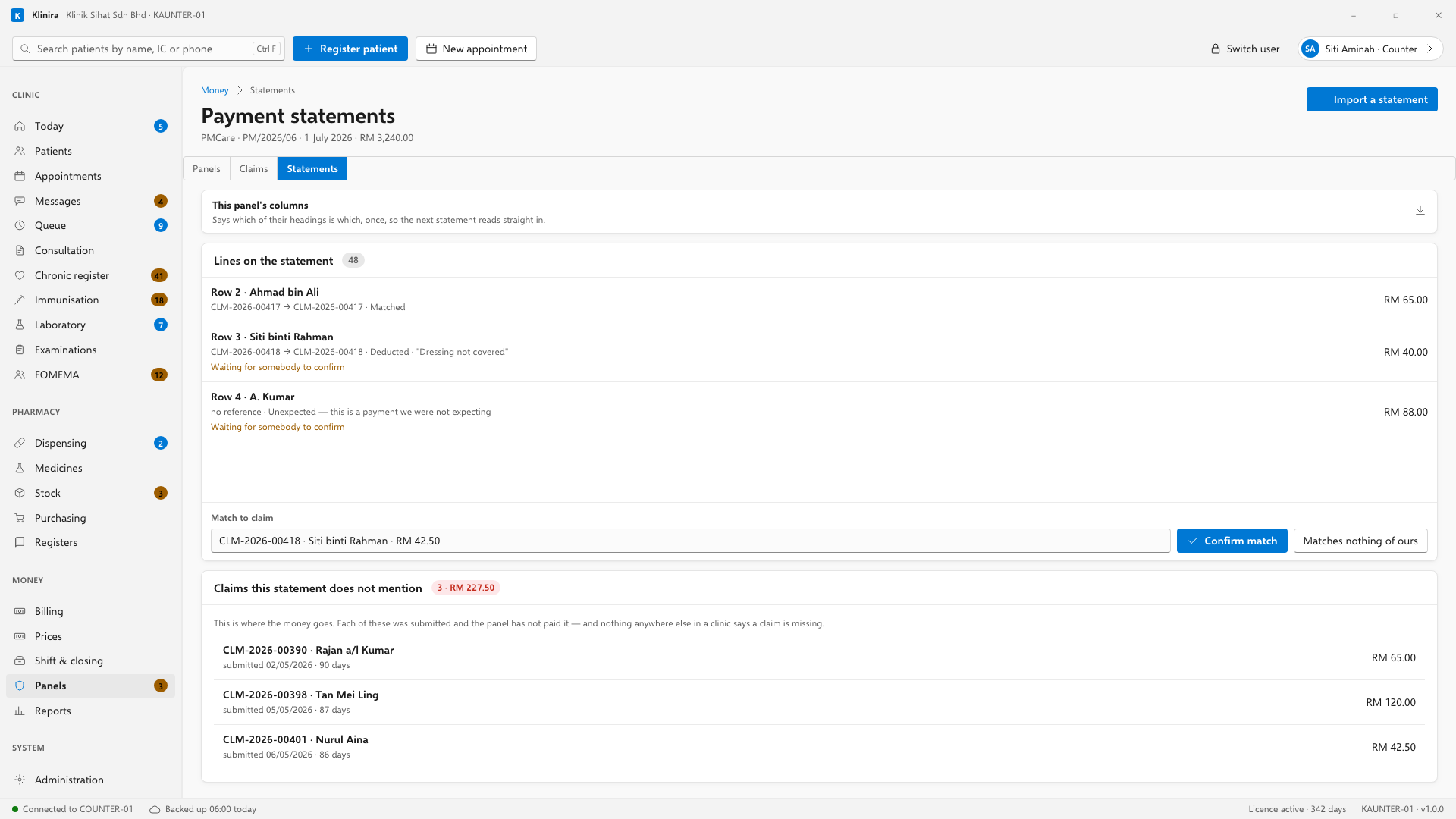
- 1When the statement arrives, save it as a CSV and choose the file.
- 2The first time for a panel, open This panel's columns and pair their headings with ours. Press Suggest from the file and Klinira reads their own headings and proposes a pairing — then check every one before saving.
- 3Import. Klinira lines every row up against what you claimed and sorts them into five piles.
- 4Rows that matched exactly — same reference, same amount to the sen — are closed for you. Everything else waits for you to press Confirm, and who confirmed it is recorded.
| Pile | What to do |
|---|---|
| Paid in full | Nothing. Closed already. |
| Paid short | Telephone them. There is no reason on the statement, so somebody has to ask. |
| Deducted | They gave a reason. Read it and decide whether it is worth appealing. |
| A payment you were not expecting | Match it to a claim by hand, or say it matches nothing of yours. |
| Not on the statement at all | This is the important one. Read on. |
The seven reports
- Claim aging by panel — how much each one owes you right now, and which of them are past their own terms.
- Claims not yet submitted — the ones nobody sent. Empty this list.
- Queries outstanding, with deadlines — sorted by what has to go out today.
- Short payment analysis — one short payment is an argument; the same deduction on forty claims is a clause somebody has misread.
- Revenue by panel against cash — how much of your work is panel work.
- Panel profitability — what each panel is worth against what its medicines cost you.
- Rejected claims by reason — forty refusals for one missing field is one thing to change at the counter.
Take a place in the first installs
Klinira is being built now. Leave your details and you will hear what is finished, be asked what your clinic actually needs, and get the first install dates when it is ready.