Backup, restore and getting your data out
Backups run by themselves. The part that needs a person is proving one works, and it is the only item on the getting-started list that really matters.
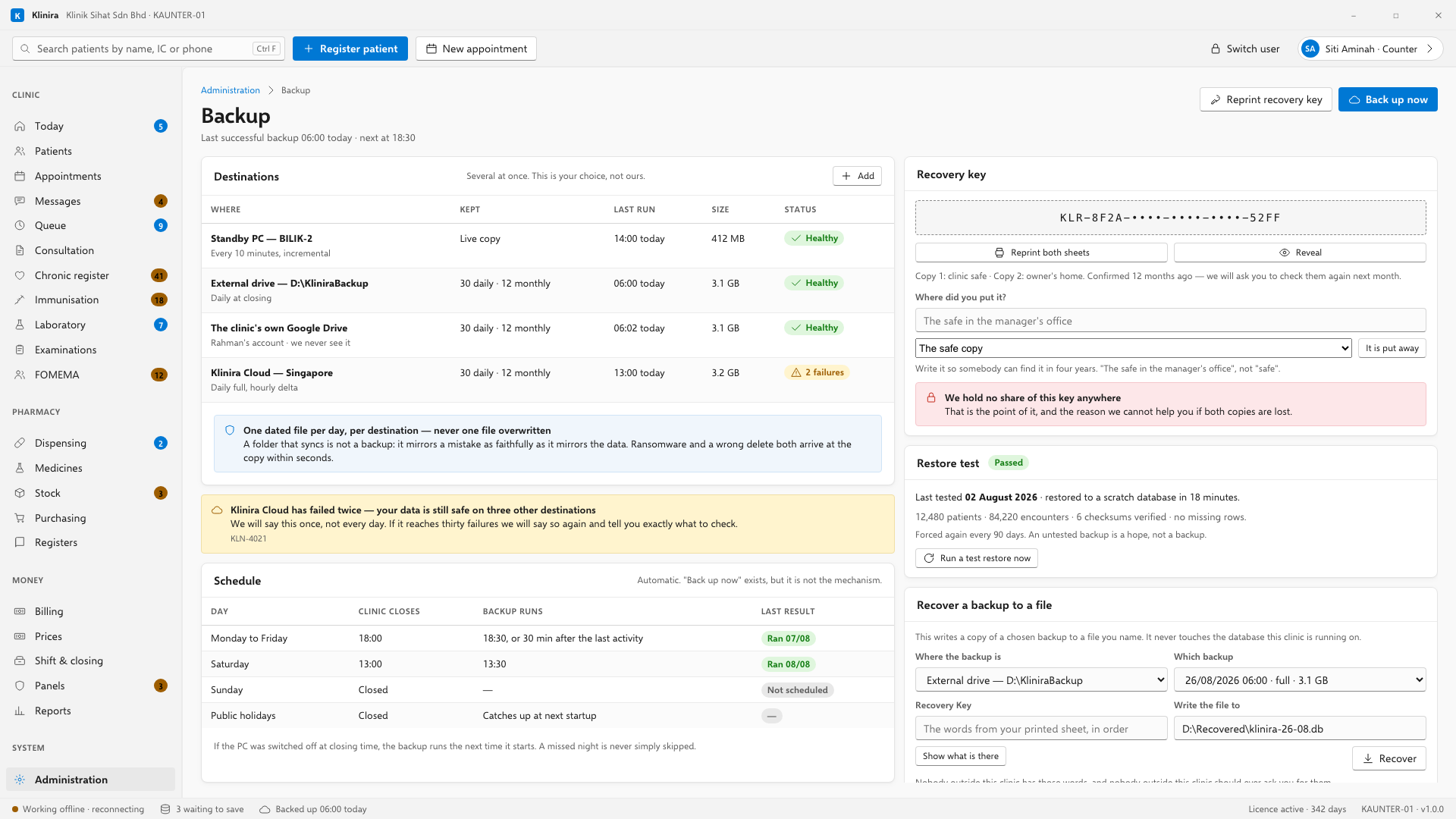
Where backups go
- An external drive, or a folder in your own cloud storage. Never the same physical disk as the database.
- Klinira Cloud, encrypted before it leaves the building, if your plan includes it.
- More than one destination is better than one, and Klinira will use all of them.
Proving a backup works
Press the button that restores a backup into a scratch copy and checks it opens and is complete. Do it on your first week, and let Klinira repeat it every ninety days.
When a backup fails
- Almost always the drive is unplugged, full, or the folder has been renamed.
- Klinira tells you once per failure, not every morning. A clinic told daily that its drive is unplugged stops reading the message by Thursday, and the message after that is the one they needed.
- The bottom strip of every screen carries the days since the last successful backup anywhere.
Recording where each Recovery Key sheet went
The wizard asked on installation day. This is where you answer it again — after reprinting a sheet, after moving a safe, or after an owner takes the second copy home to a different house. Choose which sheet, write where it is, and press It is put away.
Recovering a backup to a file
This is the one to reach for when somebody needs yesterday's records back — a patient's record that was deleted in error, a figure somebody wants to check against last month. It writes a copy of a chosen backup to a file you name, and it never touches the database the clinic is running on.
- 1Choose where the backup is, then Show what is there — Klinira lists every restore point that destination holds, with its date and size.
- 2Pick which backup, and type the Recovery Key words from your printed sheet, in order.
- 3Say where to write the file, and press Recover. Klinira counts every record that came back.
Replacing the database itself
Putting a backup back in place of the database a clinic is running on is a different job, and it is not done from a workstation while the clinic is open. It is done on the main PC with the Klinira service stopped, usually on a fresh installation. Telephone support and keep your Recovery Key to hand.
Getting your data out
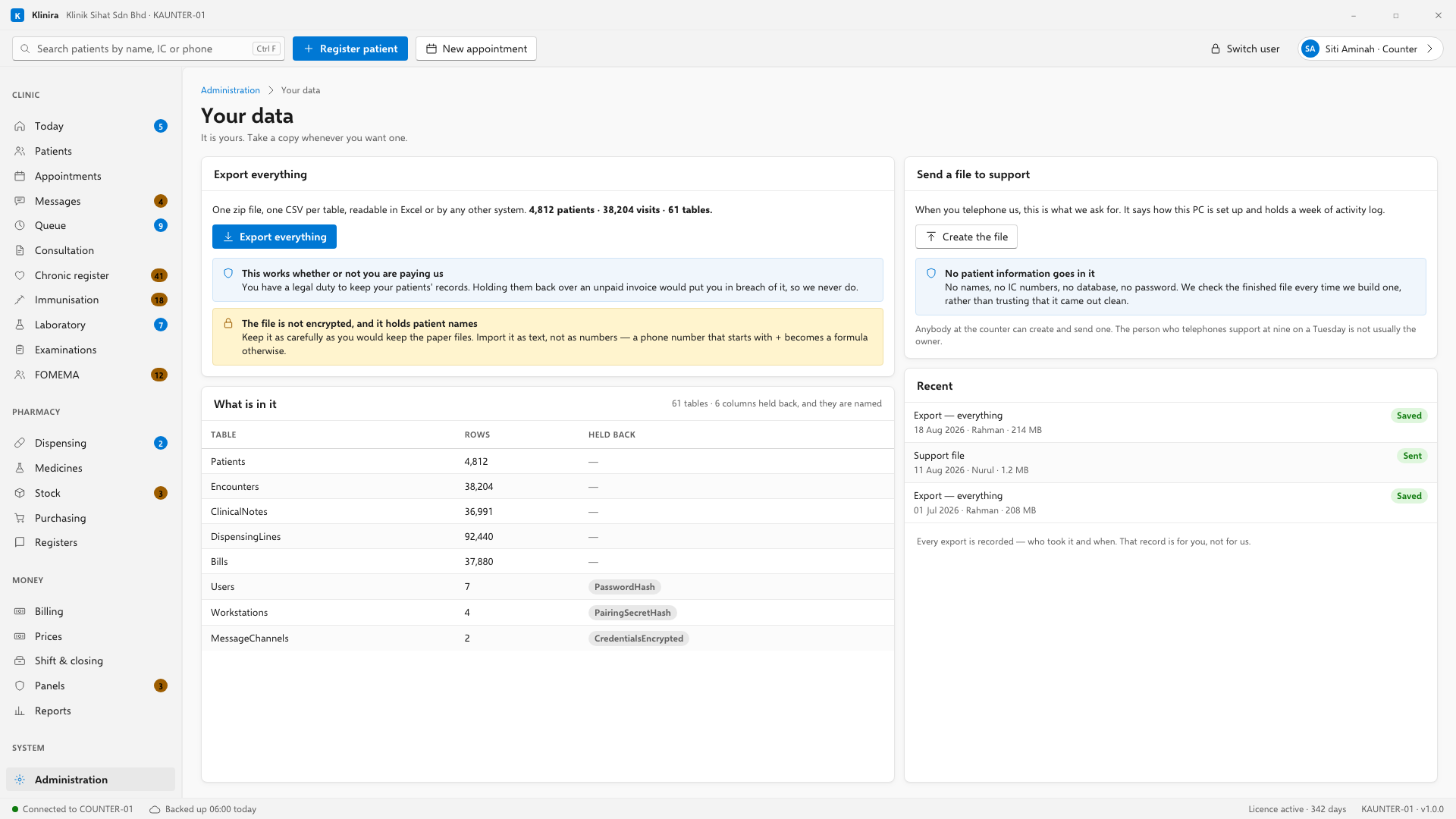
Export works in every licence state — trial, active, expired, read-only, locked. Your clinic has a statutory duty to maintain patient records, and holding your data would put you in breach of the law. We lock features; we never lock data.
- The export is a zip of CSV files, one per table, with a README explaining what each is.
- Values are exactly what the database holds. Import it as text — a Malaysian mobile number written +60123456789 is something Excel will otherwise treat as a formula.
- Passwords, keys and credentials are not in it.
The diagnostic file
When you telephone support, they may ask for a diagnostic file. Anybody in the clinic can make one — the person who telephones support at nine on a Tuesday is the counter clerk, and a file only the owner can produce is a file that arrives on Thursday.
Take a place in the first installs
Klinira is being built now. Leave your details and you will hear what is finished, be asked what your clinic actually needs, and get the first install dates when it is ready.