Roles and permissions
The seven roles Klinira supplies are starting points, not rules. Change what any of them may do, or make one that fits a job in your clinic.
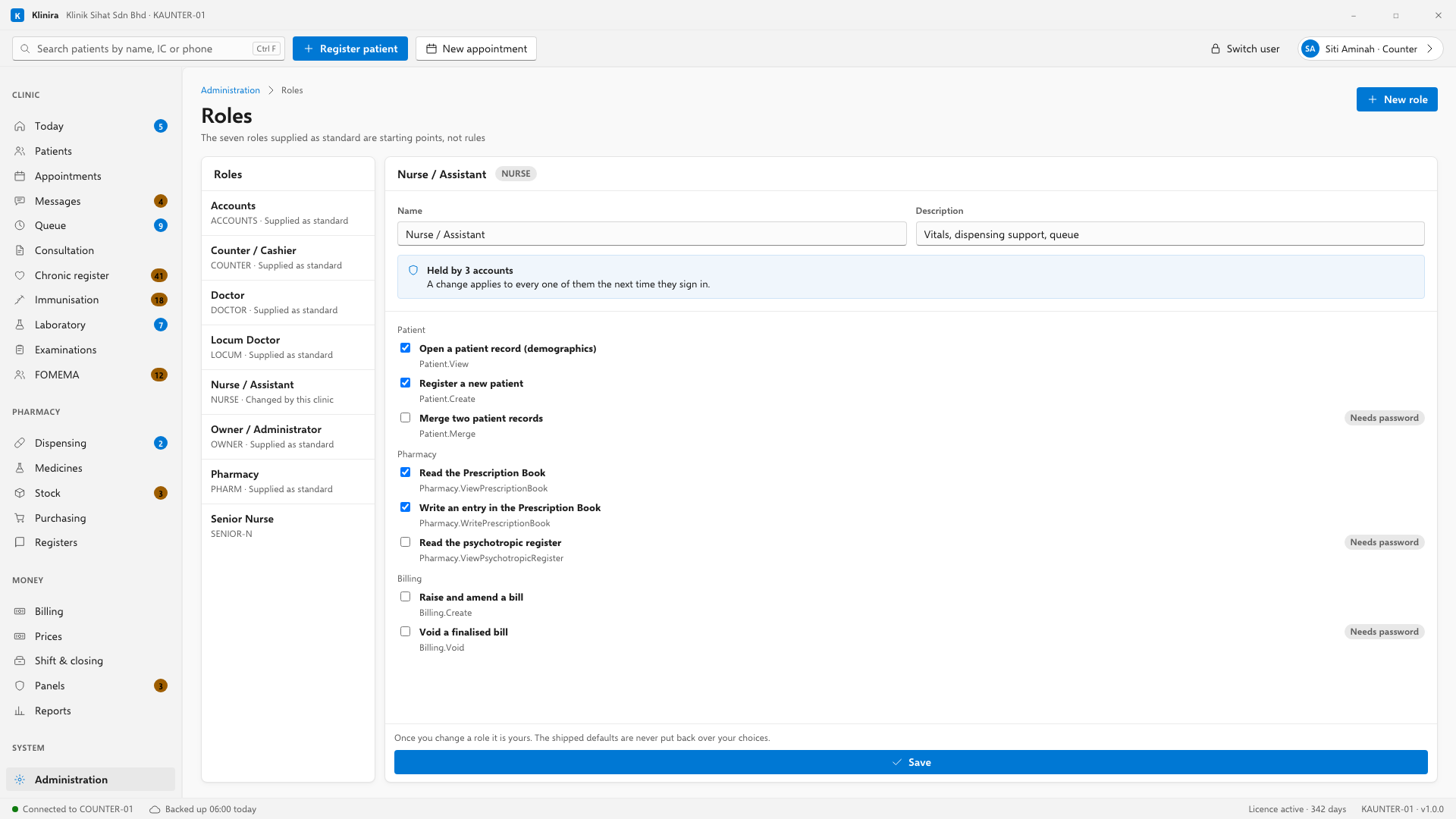
The seven supplied as standard
| Role | Meant for |
|---|---|
| Owner / Administrator | Everything, including staff and money settings |
| Doctor | Clinical records, prescribing, own reports |
| Nurse / Assistant | Vitals, dispensing support, queue |
| Counter / Cashier | Registration, appointments, billing, payments |
| Pharmacy | Dispensing, stock, the statutory registers |
| Accounts | Financial reports and panel reconciliation, no clinical access |
| Locum Doctor | As Doctor, minus anything that changes settings or money |
Changing what a role may do
- 1Open Administration, Roles.
- 2Pick the role on the left.
- 3Tick and untick on the right. Every permission is shown by what it does, with its code beneath.
- 4Save. It applies to everybody holding that role the next time they sign in.
If your senior nurse should run the Prescription Book, tick that permission on the Nurse role and she can. You do not need to ask us, and you do not need to give her a pharmacist's login — which is how a clinic ends up with an audit trail naming the wrong person.
Making a new role
- 1Press New role.
- 2Give it a short code in capitals. That code appears in the log afterwards and cannot be changed later, so choose something like SENIOR-N rather than a name that might be re-used.
- 3Name it, and tick what it may do.
- 4Create.
Three refusals
- You cannot leave the clinic with nobody able to manage staff or roles. That would lock you out of your own system with no way back.
- You cannot delete a role somebody still holds. Move those people first.
- You cannot delete one of the seven supplied as standard, though you may change everything about what it does.
Once you change a role it is yours. The supplied defaults are never put back over your choices — not on an update and not on a restart.
Permissions marked "needs password"
Some permissions carry a label beside them saying they need a password. A Quick PIN can never exercise those, whoever holds them and however you set the role. Voiding a bill, adjusting stock, exporting data, merging patients and changing permissions are all marked this way.
Take a place in the first installs
Klinira is being built now. Leave your details and you will hear what is finished, be asked what your clinic actually needs, and get the first install dates when it is ready.