Dental charting and the gum chart
The chart is a record, not a picture of today. Every visit adds a layer, nothing is overwritten, and you can see the mouth as it was on any past date.
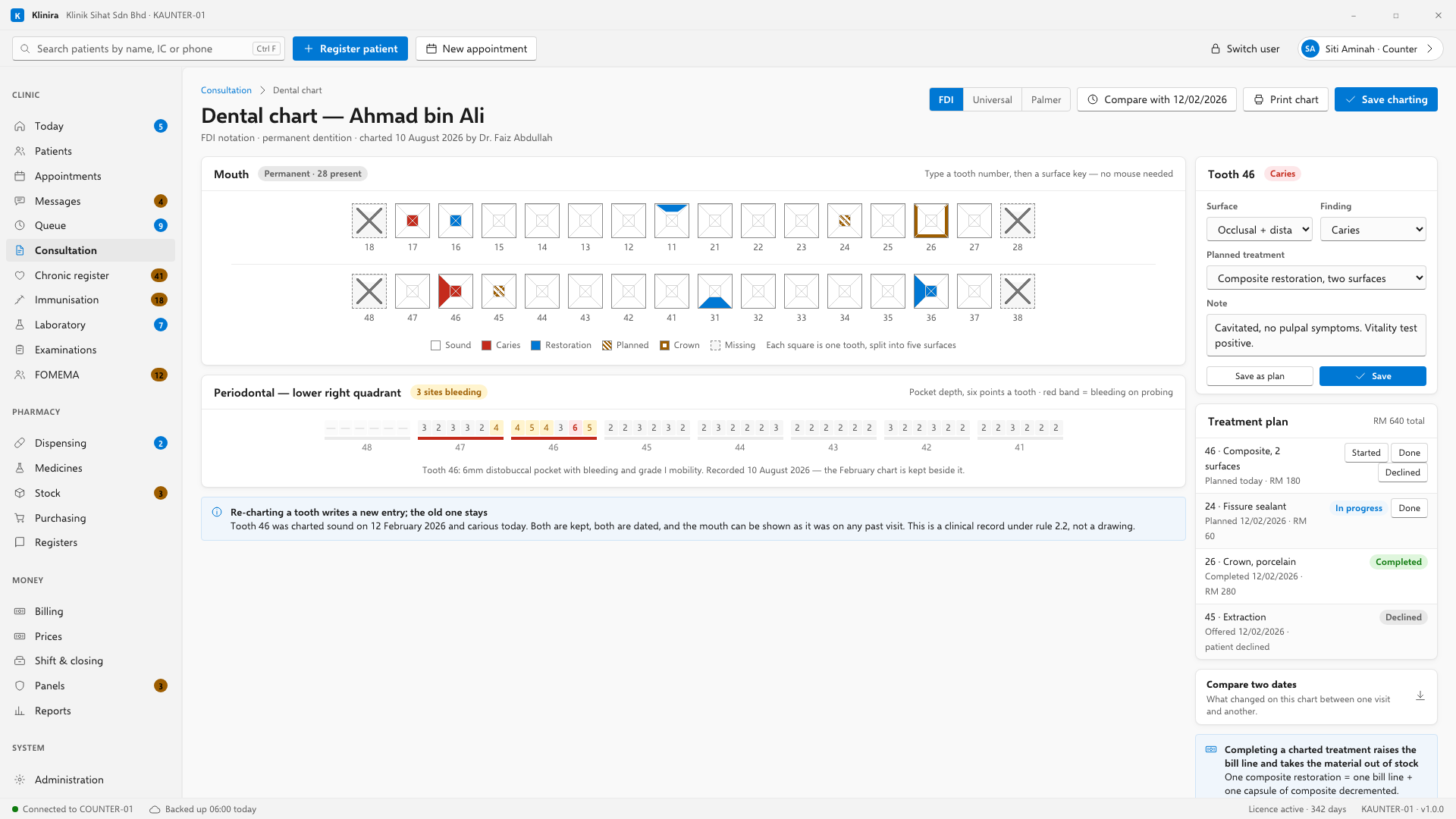
Charting
- 1Type the tooth number. FDI two-digit — the notation Malaysian schools teach.
- 2Type the surface. F is the cheek and lip side, L is the tongue side, and the tooth decides which name that lands on.
- 3Type the finding, or the treatment you have just done.
- 4Press Enter. The tooth updates and the cursor is ready for the next one.
Found, or done
There is one distinction the chart turns on, and it is worth getting right. Recording that you found an old filling somebody else placed is not the same as recording that you placed one today. The second consumes material and raises a bill line; the first does neither.
Correcting a chart entry
- Charting the wrong tooth is corrected the same way a note is: a new entry supersedes the old one and both stay.
- A correction does not put material back into stock. The dentist who charted a composite on the wrong tooth still used the composite. If it truly was not used, that is a stock adjustment with a reason.
- A correction does not bill the patient twice. It is the same treatment.
The treatment plan
A plan is what has been agreed and not yet done. Chart the findings as usual and press Save as plan instead of Save — the tooth is marked as planned rather than treated, and nothing is billed and no material comes out of stock until the work is actually done.
- Started marks work that has begun over more than one visit — a crown between the preparation and the fit.
- Done closes it. That is the point at which the material leaves stock and the line reaches the counter.
- Declined takes a typed reason. It is what answers the question two years later, when the tooth is worse and somebody asks whether it was ever offered.
Seeing the chart as it was
Pick a date and the chart shows the mouth as it stood then. When a patient asks why a tooth was filled three years ago, the chart from three years ago is still there — and so is the note beside it.
Compare two dates is the strip below the plan. Give it a from and a to, and it lists what changed on the chart between them — which is the question a recall appointment actually asks.
The gum chart
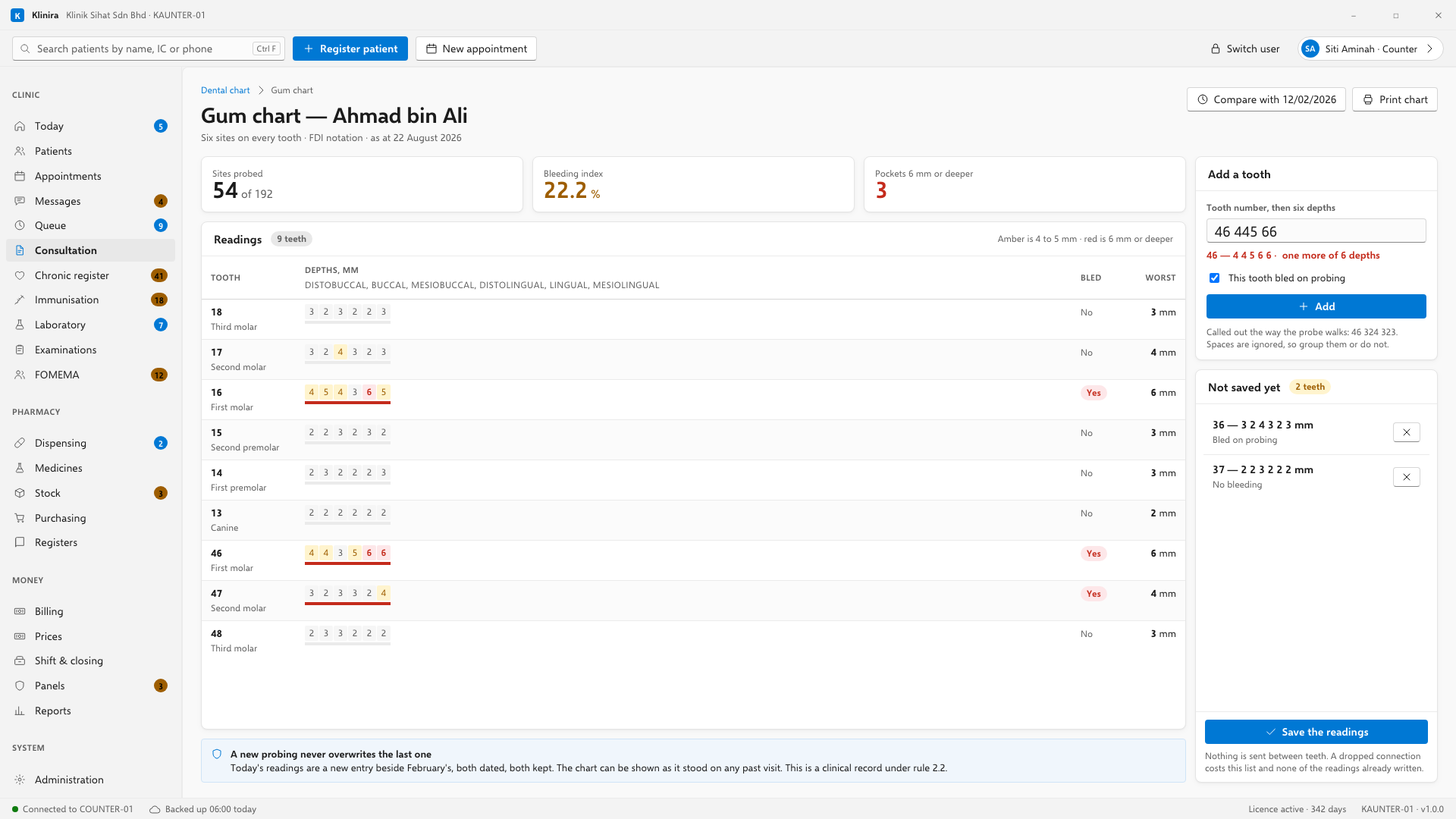
- 1Type the tooth number, then the six depths in millimetres, then Enter.
- 2Mark bleeding on probing where you found it.
- 3Work through the mouth. The tooth is added to a pending list as you go.
- 4Save the readings when you are done. Nothing is sent between teeth, so a dropped connection costs this list and none of the readings already written.
- Three millimetres or less is a normal sulcus. Six or more is severe.
- The bleeding index and the count of deep pockets work themselves out as you type.
- Print the chart as an arch for the patient's file. The screen shows a table because 192 numbers do not fit on a clinic monitor as an arch.
Take a place in the first installs
Klinira is being built now. Leave your details and you will hear what is finished, be asked what your clinic actually needs, and get the first install dates when it is ready.